Explore, query, and visualize your databases — all in one app.






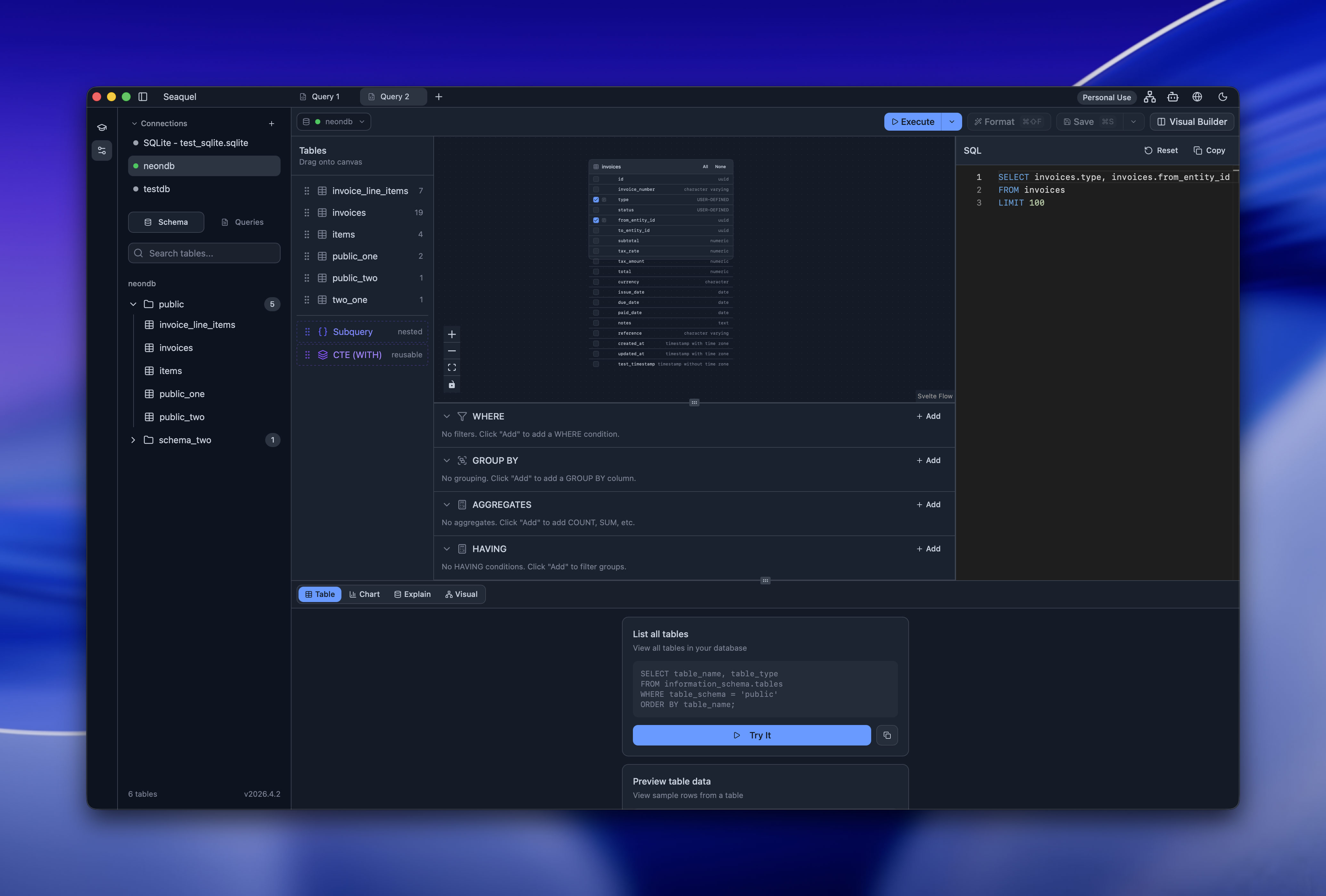
Works with 6 database engines. No account required. Open source, free for personal use.
Try it in your browser in seconds.
- SQL editor — Syntax highlighting, formatting, parameter support, and Monaco-based editing
- Inline result editing — INSERT, UPDATE, and DELETE rows directly from the results table
- Visual query builder — Drag-and-drop canvas for building queries without SQL
- AI assistant — Get help writing and understanding SQL queries
- SQL learning sandbox — Interactive challenges to practice SQL
- Schema browser — Explore tables, columns, indexes, constraints, and more
- Entity Relationship Diagrams — Auto-generated ERDs with PNG/SVG export
- EXPLAIN/ANALYZE visualizer — Understand query plans with hot path detection
- Database statistics — Dashboard with table sizes, row counts, and index usage
- Data visualization — Bar, line, pie, and scatter charts from query results
- CSV/JSON export — Export query results to CSV or JSON
- Query sharing — Share queries via Git repositories
- Connection import — Import connections from DBeaver and TablePlus
- Multi-project — Organize connections and queries across projects
- Themes — Light and dark modes with a built-in theme editor
- Internationalization — Available in English, Spanish, German, French, Arabic, and Korean
- Command palette — Quick access to all actions via keyboard
- SSH tunneling — Connect securely through SSH tunnels
- Auto-updates — Stay current with automatic update notifications
| Seaquel | DBeaver | TablePlus | DataGrip | pgAdmin | |
|---|---|---|---|---|---|
| Open source | ✅ | ✅ | ❌ | ❌ | ✅ |
| Multi-database | ✅ | ✅ | ✅ | ✅ | ❌ |
| Browser demo | ✅ | ❌ | ❌ | ❌ | ❌ |
| ERD generation | ✅ | ✅ | ✅ | ✅ | ❌ |
| Visual query builder | ✅ | ✅ | ❌ | ❌ | ✅ |
| EXPLAIN visualizer | ✅ | ✅ | ❌ | ✅ | ✅ |
| Free for personal use | ✅ | ✅ | ❌ | ❌ | ✅ |
| Lightweight | ✅ | ❌ | ✅ | ❌ | ✅ |
Download Seaquel for your platform from seaquel.app/download.
| Platform | Architectures |
|---|---|
| macOS | Intel (x86_64), Apple Silicon (ARM64) |
| Linux | x86_64, ARM64 |
| Windows | x86_64, ARM64 |
Want to try it first? Check out the browser demo (powered by DuckDB WASM).
Seaquel ships a single container image at ghcr.io/webstonehq/seaquel,
multi-arch (linux/amd64 + linux/arm64). It runs SvelteKit + Better Auth on
the public port and a loopback-only Rust database service as a subprocess
in the same container — one artifact, one docker run. A Seaquel subscription
license key is required at first signup, the same as Cloud.
docker run \
  --name seaquel \
  -p 8787:8787 \
  -v seaquel-data:/data \
  ghcr.io/webstonehq/seaquel:latest
That's it. Visit http://localhost:8787. The first user to sign up presents an owner license key from a Seaquel subscription — that key registers this install with seaquel.app and binds the user as Owner. Subsequent teammates sign up by pasting their own member license key from the same subscription's seat pool.
Persistent state lives in /data: auth.db for identity, one
users/<userId>/meta.db per user, and an auto-generated auth-secret
file the container uses to sign sessions. Back up that volume and you
back up everything.
# From a checkout of this repo:
docker compose -f deploy/docker/docker-compose.yml up -d
The compose file pulls the pre-built image by default; flip to building
from source by uncommenting the build: block. The .env.example file
in deploy/docker/ documents the optional knobs below — copy it to
.env only if you need to override something.
The defaults work out of the box: port 8787, data at /data, talks to
https://seaquel.app for licensing, and auto-generates a session-signing
secret at /data/auth-secret on first boot. Set the variables below only
when the default doesn't fit your deployment.
| Variable | Set this when… |
|---|---|
SEAQUEL_TRUSTED_ORIGINS |
Deploying on a real domain. Localhost variants are always trusted. Comma-separated origins Better Auth's CSRF check allows. |
BETTER_AUTH_URL |
Sitting behind a reverse proxy that rewrites Host, or silencing the boot warning below. Sets Better Auth's canonical URL. |
SEAQUEL_AUTH_SECRET |
Running multiple replicas. All replicas must share a session key; single-container installs don't need to set this. |
SEAQUEL_COOKIE_DOMAIN |
Sharing sessions across subdomains, e.g. .example.com. |
SEAQUEL_CONTROL_URL |
Pointing at a staging control plane, or http://127.0.0.1:1 to test offline mode. Default https://seaquel.app. |
PORT / DATA_DIR |
Overriding 8787 / /data. |
Internal tuning knobs (SEAQUEL_LICENSE_SOFT_TTL, SEAQUEL_LICENSE_GRACE_TTL,
SEAQUEL_BUNDLE_TRUSTED_PUBKEY) have sensible defaults documented inline
in the source; set them only when you need to.
With BETTER_AUTH_URL unset, every boot logs:
WARN [Better Auth]: [better-auth] Base URL could not be determined. Please
set a valid base URL using the baseURL config option or the
BETTER_AUTH_URL environment variable. Without this, callbacks and
redirects may not work correctly.
This is expected and harmless for a single-host install reached at its
own Host — signup, sessions and cookies all work, since the relevant
requests are same-origin. Set BETTER_AUTH_URL to the instance's public
URL to silence it, and do set it whenever anything rewrites Host or you
rely on absolute links (e.g. emailed callbacks).
Self-hosted Seaquel can run without any outbound calls to seaquel.app. The owner downloads a signed license bundle from the seaquel.app dashboard and uploads it to the instance. From that point, all license checks happen locally against the bundle; the seaquel.app control plane is never contacted.
Workflow:
- Subscription owner signs in to seaquel.app and visits
https://seaquel.app/dashboard/<slug>/airgap(the "Offline bundle" tab appears for self-hosted tenants). - Owner reviews seat assignments and revocations, then clicks "Download
offline license bundle". A signed
.bundlefile downloads. - Owner transfers the file to the self-hosted instance (USB, SCP, etc.)
and uploads it via
/settings/airgap(or/airgap-setupif no user is bound yet). - The instance verifies the bundle's signature, walks any revocations, and switches to offline mode. The control plane is no longer called.
Renewal:
- Bundles expire
currentPeriodEnd + 30 days. Owners download a fresh bundle each billing cycle from the same dashboard page. - Revocations are cumulative — each new bundle carries the full revocation list for the subscription.
- A subscription cancellation in seaquel.app automatically adds all of that subscription's license keys to the revocation list (so the next bundle the owner downloads carries the revocations).
- If the bundle isn't refreshed before
not_after, the install enters a read-only revalidate state until a fresh bundle is imported.
Return to online mode:
- An owner can remove the offline bundle via
/settings/airgap→ "Remove offline bundle". The instance will resume calling seaquel.app on the next license check. Make sure connectivity is restored before removing the bundle.
Trust anchors:
A bundle is verified against the public half of the signing keypair. The
private half — a 32-byte Ed25519 seed — lives only on the control plane,
as the SEAQUEL_BUNDLE_SIGNING_PRIVATE_KEY secret on seaquel-app. The
public half is compiled into this repo, as PROD_TRUSTED_PUBKEYS in
src/lib/server/airgap/bundle-store.ts.
To derive that public half from a seed without minting anything, pass
--only-derive:
node scripts/mint-airgap-bundle.ts --only-derive --seed-hex=<64-hex>stdout carries just the SEAQUEL_BUNDLE_TRUSTED_PUBKEY=… line, so it can
be piped or captured; stderr prints the fingerprint and pubkey separately,
plus a paste-ready PROD_TRUSTED_PUBKEYS entry. Omit --seed-hex and it
generates a fresh keypair and prints the seed as well — the seed is the
private half, so it belongs in the control-plane secret and nowhere else.
The fingerprint is the first 16 bytes of SHA-256(pubkey), and the
verifier looks keys up by it, so an anchor whose fingerprint does not
match its pubkey rejects every real bundle instead of erroring. The
ships a well-formed built-in production set test in
bundle-store.test.ts guards against exactly that.
Because PROD_TRUSTED_PUBKEYS is a list, a key rotation can ship a
release carrying both the old and new anchors, switch the control-plane
secret, then drop the old entry in a later release.
Optional dev override:
SEAQUEL_BUNDLE_TRUSTED_PUBKEY— comma-separated list of<fingerprint>:<hex-pubkey>entries to trust additional signing keys (for testing with a dev keypair). Production releases ship with the seaquel.app production fingerprint baked in.
Two smoke-test flows are documented below: Online mode (against the real licensing control plane) and Air-gapped mode (with a dev-minted bundle, no outbound network). Both build the same image.
cd path/to/seaquel
docker build -t seaquel:test .
The first build takes ~5 min (Rust + Node); subsequent builds reuse layers.
A dedicated volume (seaquel-test-data) keeps the smoke-test isolated from
any production container on the same machine.
docker run \
  --name seaquel-test \
  -p 8787:8787 \
  -v seaquel-test-data:/data \
  seaquel:test
No env vars needed for a localhost smoke test — 127.0.0.1:8787 is
auto-trusted by the CSRF gate and the session secret auto-generates on
first boot. Wait for the health check to pass (~20 s), then probe it:
docker ps --filter name=seaquel-test --format '{{.Status}}'
curl http://localhost:8787/health
In the browser at http://localhost:8787:
/signup— the first user becomes the tenant Owner. Paste an owner-tier subscription license key when prompted.- Create a project, add a connection (try a Postgres/MySQL you have
access to, or a local SQLite path like
/data/test.db). - Save the password on the connection — the credential-vault setup dialog should appear. Pick a passphrase; credentials are encrypted in the browser before they ever reach the server (zero-knowledge).
- Run a query, browse the schema, verify everything works.
Cleanup:
docker rm -f seaquel-test
docker volume rm seaquel-test-dataExercise the offline flow with a locally-minted bundle. Air-gapped mode
itself is purely bundle-driven: once a bundle is imported, the dispatcher
in licensing.ts routes every call to local helpers and never touches
the network. A real air-gapped deployment just imports the bundle —
there's no env var that turns offline mode "on."
1. Mint a bundle with a dev keypair.
node scripts/mint-airgap-bundle.ts \
  --owner-key=DEV-OWNER \
  --member-key=DEV-MEMBER \
  --out=/tmp/seaquel-test.bundle
The script prints to stderr a line like:
SEAQUEL_BUNDLE_TRUSTED_PUBKEY=c6cf6554…:6fecf261…
Copy that line — the container needs it as an env var so its verifier
trusts the dev keypair just generated. The baked-in
PROD_TRUSTED_PUBKEYS anchor only covers bundles signed by seaquel.app,
so this override is always required for locally minted bundles. To mint
many bundles with the same trust anchor across runs, capture the
--seed-hex=… line the script also prints and pass it back on
subsequent invocations — or re-derive the anchor from that seed later
with --only-derive (see "Trust anchors" above).
2. Run the container.
TRUSTED_PUBKEY='c6cf6554…:6fecf261…'   # the line from step 1's stderr

docker run \
  --name seaquel-airgap-test \
  -p 8787:8787 \
  -v seaquel-airgap-data:/data \
  -e SEAQUEL_BUNDLE_TRUSTED_PUBKEY="$TRUSTED_PUBKEY" \
  seaquel:test
Optional test scaffold: if you want to prove the airgap path doesn't leak any network calls, also pass
-e SEAQUEL_CONTROL_URL=http://127.0.0.1:1. That points the would-be control-plane URL at a closed port, so any bug in the dispatcher that accidentally tried to call out would surface as a loud transport error instead of silently reaching real seaquel.app. It does nothing for normal operation — air-gapped mode skips the network regardless of where this URL points. Real air-gapped deployments, where the host has no outbound network at all, can leave the default in place.
3. Import the bundle.
Visit http://localhost:8787 in the browser. The layout redirects
unauthenticated visitors to /airgap-setup whenever (a) no tenant is
yet bound and (b) no bundle is loaded. Upload /tmp/seaquel-test.bundle
there. On success you'll see tier/seats/expiry; the page then offers a
"Continue to signup" link.
4. Sign up with the bundle's owner key.
At /signup, use DEV-OWNER as the license key. The dispatcher routes
through airgap.registerInstallLocal (because a bundle is loaded), the
owner's member_license row is written with is_owner=1, and a session
cookie comes back. No network call to seaquel.app happened.
5. Try signing up with a key the bundle doesn't know.
Open a private window, hit /signup, paste any random string as the
license key. Expect a license_not_found rejection from
verifyLocalMembershipLicense.
6. Sign up the member.
Use DEV-MEMBER as the license key. Should succeed.
7. Confirm the install is in offline mode.
Settings → Offline license bundle → the badge reads AIRGAP and lists
tier, seats, expiry, and the truncated pubkey fingerprint. Or via the
CLI:
docker exec seaquel-airgap-test node -e \
  'console.log(require("better-sqlite3")("/data/auth.db", { readonly: true })
    .prepare("SELECT mode FROM install_cache WHERE id = 1").get().mode)'
airgap confirms the dispatcher is in bundle-driven mode.
(The image has no sqlite3 binary — query the file through the
better-sqlite3 module the server itself uses.)
8. Test the revocation walk.
Mint a fresh bundle that revokes the member's key (note: the new bundle
must have an issued_at strictly newer than the current one and the
same subscription_id):
node scripts/mint-airgap-bundle.ts \
  --seed-hex=$LAST_SEED   # the --seed-hex line from step 1's stderr
  --owner-key=DEV-OWNER \
  --member-key=DEV-MEMBER \
  --revoked-keys=DEV-MEMBER \
  --out=/tmp/seaquel-test-v2.bundle
Upload the new bundle at /settings/airgap as the owner. The endpoint
walks member_license, stamps revoked_at on the member's row, and
deletes their Better Auth session in one transaction. The member's next
request returns 403 and they're bounced back to login.
9. Test offline → online transition.
Still as the owner, click "Remove offline bundle" at /settings/airgap.
The instance clears the bundle and flips install_cache.mode back to
online. member_license bindings are kept, so both users stay signed
in.
You will not land on /revalidate right away — not even with the
SEAQUEL_CONTROL_URL=http://127.0.0.1:1 scaffold from step 2. The
license state is cached: last_validated_at was stamped when the bundle
was imported, so for the next 24 h (SEAQUEL_LICENSE_SOFT_TTL) the
install is "soft fresh" and makes no control-plane call at all. Once
that lapses it attempts a refresh, and if the call fails it keeps working
until grace_until — also stamped at import, default 14 days
(SEAQUEL_LICENSE_GRACE_TTL) — before dropping to revalidate.
Both windows are stored as absolute timestamps at import time, so
changing those two env vars afterwards does not move them. To reach the
revalidate state now, age the stored timestamps directly:
docker exec seaquel-airgap-test node -e '
  const db = require("better-sqlite3")("/data/auth.db");
  const past = Math.floor(Date.now() / 1000) - 3 * 24 * 3600;
  db.prepare("UPDATE install_cache SET last_validated_at = ?, grace_until = ? WHERE id = 1")
    .run(past, past);
'
The next request then logs license refresh failed (the closed-port
scaffold proving the call was actually attempted), redirects to
/revalidate, and returns 403 from /api/* until a fresh bundle is
imported. Without the scaffold the call reaches real seaquel.app and
fails with a 4xx, since this dev container was never registered
upstream.
Cleanup:
docker rm -f seaquel-airgap-test
docker volume rm seaquel-airgap-data| Feature | PostgreSQL | MySQL | MariaDB | SQLite | MSSQL | DuckDB |
|---|---|---|---|---|---|---|
| Connect & query | ✅ | ✅ | ✅ | ✅ | ✅ | ✅ |
| Schema browser | ✅ | ✅ | ✅ | ✅ | ✅ | ✅ |
| EXPLAIN visualizer | ✅ | ✅ | ✅ | ✅ | ✅ | ✅ |
| ERD generation | ✅ | ✅ | ✅ | ✅ | ✅ | ✅ |
| Inline editing | ✅ | ✅ | ✅ | ✅ | ✅ | ✅ |
| Statistics dashboard | ✅ | ✅ | ✅ | ✅ | ✅ | ✅ |
- Discord — Chat, ask questions, share feedback
- GitHub Issues — Bug reports and feature requests
Contributions are welcome! Here's how to get started:
- Browse the open issues to find something to work on
- For larger changes, open an issue first to discuss your approach
- Fork the repo, create a branch, and submit a pull request
Use mise to install the required toolchain:
mise installThis installs Node.js and Rust as defined in mise.toml.
git clone https://github.com/webstonehq/seaquel.git
cd seaquel
npm installnpm run tauri:dev # Start development, note "tauri:dev" vs the default "tauri dev"
npm run tauri build # Build production app
npm run check # Type checking
npm run check:watch # Type checking (watch mode)- Tauri — Native app shell with Rust backend
- SvelteKit — App framework
- Svelte — UI with runes-based reactivity
- TypeScript — Type safety
- Tailwind CSS — Styling
- Rust — Backend plugins and system integration
Seaquel splits its source from the binaries we distribute.
Source code — MIT. View it, modify it, redistribute it, and build and run your own binaries, including at work, with no license from us. The MIT grant does not extend to the Seaquel name, logo, or branding, so please don't ship your builds under them.
Official desktop binaries — the builds on seaquel.app/download, GitHub Releases, and the in-app updater are free for personal, non-commercial use. Using them for work requires a commercial license: see pricing.
Seaquel Cloud and the self-host image — a subscription is required for all use, personal included.
Full terms: seaquel.app/terms.