




Damdara is a core logic crate for retro-fantasy that can be built in Rust,
fully recreating the "Fukkatsu no Jumon" system from the NES version of Dragon Quest,
while also having the ability to generate status by player name, equip items, and handle combat.
🌐 Try the Web Demo - Experience Damdara directly in your browser via WebAssembly!
🏰 Alefgard - A site built with Damdara.
- Generate resurrection "Fukkatsu no Jumon" from parameters (Parameters to Password)
- Parameters generated from resurrection "Fukkatsu no Jumon" (Password to Parameters)
- Calculate parameters enhanced by name
- See list of monsters
- Refer to any monster information
- See monster graphics
- See map and character graphics
- See the battle background
- Refer to shops, inns and what people say
- Follow the conversations of events (the king, Princess Gwaelin, the Dragonlord, etc.)
- Refer to treasure chests and hidden items
- Refer to which monsters appear where
- See parameter list
- Refer to any parameter
- See list of Item
- Refer to any Item information
- See list of Weapon
- Refer to any Weapon information
- See list of Armor
- Refer to any Armor information
- See list of Shield
- Refer to any Shield information
- Reproduction of battle scenes
- See list of Town
- Refer to any Town information
- Refer to any World information
- See list of Message
- Explore the field
- Explore the Town
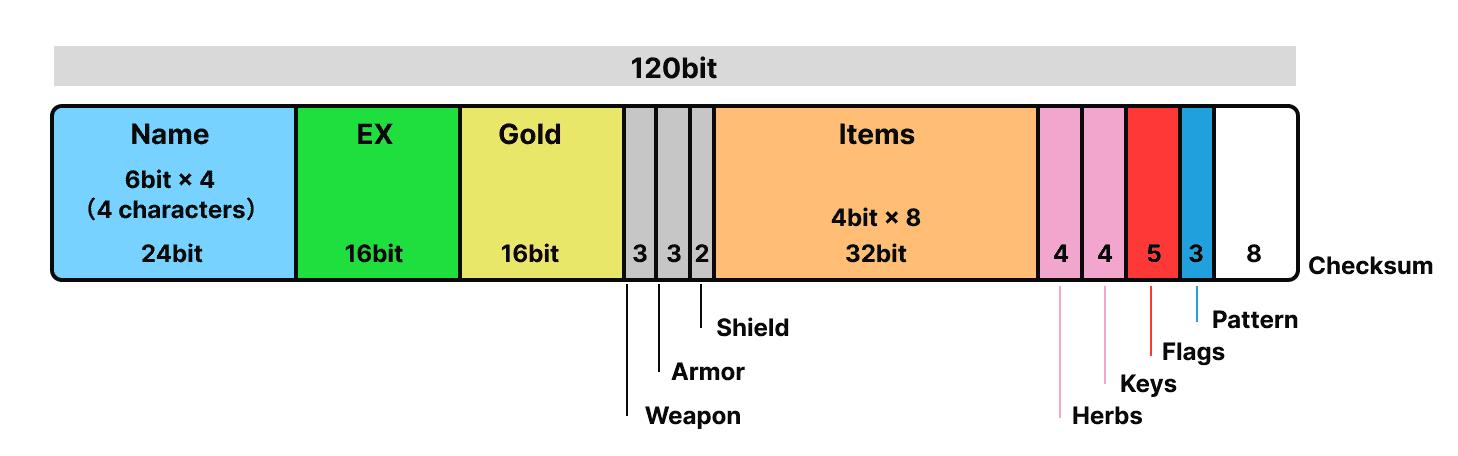
This diagram shows the 120-bit structure of the “Fufutsu no Jumon”.
The name, experience value, gold, items, equipment, key items, flag information, etc. are packed and stored strictly in bits.
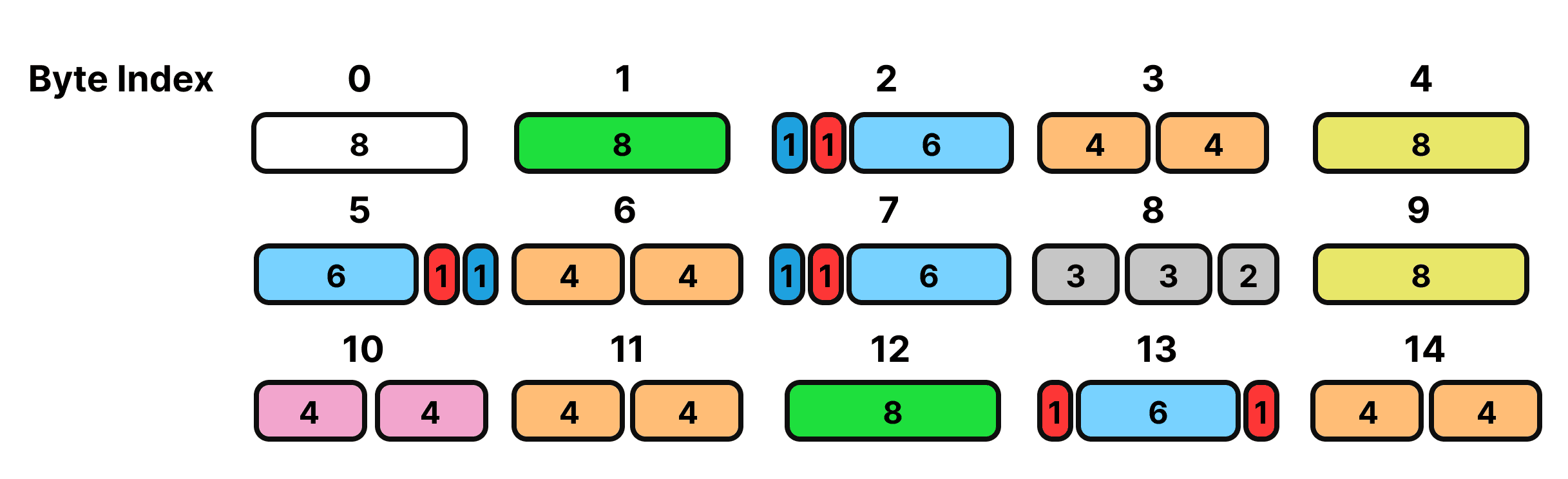
From this structure, the structure rearranged to generate the “Fufutsu no Jumon” is as follows.
Bit configuration mapping table for password generation.
| Byte Index | Field Description | Bits (from MSB to LSB) |
|---|---|---|
| 0 | Checksum (CRC-8) | [7:0] |
| 1 | Experience (lower 8 bits) | [7:0] |
| 2 | Pattern[2] (1) + Necklace (1) + Name[2] (6) | [7], [6], [5:0] |
| 3 | Item[3] + Item[2] | [7:4], [3:0] |
| 4 | Gold (lower 8 bits) | [7:0] |
| 5 | Name[0] (6) + Golem (1) + Pattern[1] (1) | [7:2], [1], [0] |
| 6 | Item[7] + Item[6] | [7:4], [3:0] |
| 7 | Pattern[0] + Dragon (1) + Name[3] (6) | [7], [6], [5:0] |
| 8 | Weapon (3) + Armor (3) + Shield (2) | [7:5], [4:2], [1:0] |
| 9 | Gold (upper 8 bits) | [7:0] |
| 10 | Keys + Herbs | [7:4], [3:0] |
| 11 | Item[5] + Item[4] | [7:4], [3:0] |
| 12 | Experience (upper 8 bits) | [7:0] |
| 13 | DragonScale (1) + Name[1] (6) + WarriorRing (1) | [7], [6:1], [0] |
| 14 | Item[1] + Item[0] | [7:4], [3:0] |
cargo install damdara
Add to project
cargo add damdara
brew tap webcyou-org/tap
brew install damdara
cargo run <input>
or
damdara <input>
If input is not present, the default brave value is returned.
cargo run

player name: ゆうてい
summary: PlayerSummary { name: "ゆうてい", level: 1, hp: 15, mp: 0, gold: 0, experience: 0 }
strength_status: StrengthStatus { level: 1, strength: 4, agility: 3, max_hp: 15, max_mp: 0, attack_power: 4, defense_power: 1, weapon: "なし", armor: "なし", shield: "なし" }
item: ["なし", "なし", "なし", "なし", "なし", "なし", "なし", "なし"]
The name can be specified by giving -n
cargo run -- -n だい

player name: た゛い
summary: PlayerSummary { name: "た゛い\u{3000}", level: 1, hp: 14, mp: 0, gold: 0, experience: 0 }
strength_status: StrengthStatus { level: 1, strength: 4, agility: 4, max_hp: 14, max_mp: 0, attack_power: 4, defense_power: 2, weapon: "なし", armor: "なし", shield: "なし" }
By granting options, you can change parameters, possess items, change equipment, and do many other things.
If you want to give 200 experience. The level is automatically reflected.
cargo run -- -n だい -e 200

player name: た゛い
summary: PlayerSummary { name: "た゛い\u{3000}", level: 5, hp: 32, mp: 20, gold: 0, experience: 200 }
strength_status: StrengthStatus { level: 5, strength: 11, agility: 10, max_hp: 32, max_mp: 20, attack_power: 11, defense_power: 5, weapon: "なし", armor: "なし", shield: "なし" }
Furthermore, if you wish to grant 300 Gold.
cargo run -- -n だい -e 200 -g 300

player name: た゛い
summary: PlayerSummary { name: "た゛い\u{3000}", level: 5, hp: 32, mp: 20, gold: 300, experience: 200 }
strength_status: StrengthStatus { level: 5, strength: 11, agility: 10, max_hp: 32, max_mp: 20, attack_power: 11, defense_power: 5, weapon: "なし", armor: "なし", shield: "なし" }
If you want to change the item possession, pass the corresponding item IDs separated by commas.
cargo run -- -n だい -i 2,3,4

player name: た゛い
summary: PlayerSummary { name: "た゛い\u{3000}", level: 1, hp: 14, mp: 0, gold: 0, experience: 0 }
strength_status: StrengthStatus { level: 1, strength: 4, agility: 4, max_hp: 14, max_mp: 0, attack_power: 4, defense_power: 2, weapon: "なし", armor: "なし", shield: "なし" }
item: ["せいすい", "キメラのつばさ", "りゅうのうろこ", "なし", "なし", "なし", "なし", "なし"]
It is also possible to put on any equipment by specifying ID.
cargo run -- -n だい -w 3 -a 5 -s 3

summary: PlayerSummary { name: "た゛い\u{3000}", level: 1, hp: 14, mp: 0, gold: 0, experience: 0 }
strength_status: StrengthStatus { level: 1, strength: 4, agility: 4, max_hp: 14, max_mp: 0, attack_power: 14, defense_power: 46, weapon: "どうのつるぎ", armor: "はがねのよろい", shield: "みかがみのたて" }
item: ["なし", "なし", "なし", "なし", "なし", "なし", "なし", "なし"]
flags are a group of flags that indicate whether a player has equipped a particular item or defeated a boss monster.
They can be specified collectively as a 5-digit bit string with the command line argument --flags.
cargo run -- -n だい --flags 01010
| option | type | default value | Description |
|---|---|---|---|
-n, --name |
String | "ゆうてい" |
Main character's name |
-e, --exp |
u16 | 0 |
XP |
-g, --gold |
u16 | 0 |
Gold in possession |
-w, --weapon |
u8 | 0 |
The number of the weapon you are equipped with |
-a, --armor |
u8 | 0 |
The number of the armor you are equipped with |
-s, --shield |
u8 | 0 |
The number of the shield you are equipped with |
-i, --item |
Vec(comma delimited) | not in possession | List of item numbers |
-y, --herbs |
u8 | 0 |
Number of herbs held |
-k, --keys |
u8 | 0 |
Number of keys held |
--flags |
Flags structure | All false | status flag |
-p, --password |
String | Maximum Strengthened Password | Fukkatsu no Jumon |
| digit position | bit | Field Name | Description |
|---|---|---|---|
| 1st digit | 0/1 | has_dragon_scale | Equipped with the scales of a dragon? |
| 2st digit | 0/1 | has_warrior_ring | Are you equipped with a warrior's ring? |
| 3st digit | 0/1 | has_cursed_necklace | Did you get the beak necklace? |
| 4st digit | 0/1 | defeated_dragon | You slayed the dragon. |
| 5st digit | 0/1 | defeated_golem | You beat the golem. |
- Specify with 5 digits 0/1 like
--flags 01000. - If not specified, default
“00000”(all false)
You can specify the mode by giving --mode or the shortcut -m.
cargo run -- --mode <input>
cargo run -- -m <input>
| Mode Name | Description |
|---|---|
| start | Calculate enhanced parameters from name only |
| save | Generate "Fukkatsu no Jumon" from arbitrary parameters (e.g. exp, gold, etc.) |
| load | Restore name/parameters from the "Fukkatsu no Jumon" |
| display | Supports list and individual display of master data |
| battle | Can battle any monster. |
| explore | Walk around the field, towns and castles with the arrow keys |
■ Start Mode
Generate parameters from the names of brave men
example
player name: た゛い
summary: PlayerSummary { name: "た゛い\u{3000}", level: 1, hp: 14, mp: 0, gold: 0, experience: 0 }
strength_status: StrengthStatus { level: 1, strength: 4, agility: 4, max_hp: 14, max_mp: 0, attack_power: 4, defense_power: 2, weapon: "なし", armor: "なし", shield: "なし" }
The default setting of the mode is here, so if you omit it, the default brave will be generated
example
cargo run

player name: ゆうてい
summary: PlayerSummary { name: "ゆうてい", level: 1, hp: 15, mp: 0, gold: 0, experience: 0 }
strength_status: StrengthStatus { level: 1, strength: 4, agility: 3, max_hp: 15, max_mp: 0, attack_power: 4, defense_power: 1, weapon: "なし", armor: "なし", shield: "なし" }
item: ["なし", "なし", "なし", "なし", "なし", "なし", "なし", "なし"]
■ Save Mode
Generates the "Fukkatsu no Jumon" from the parameters of the hero.
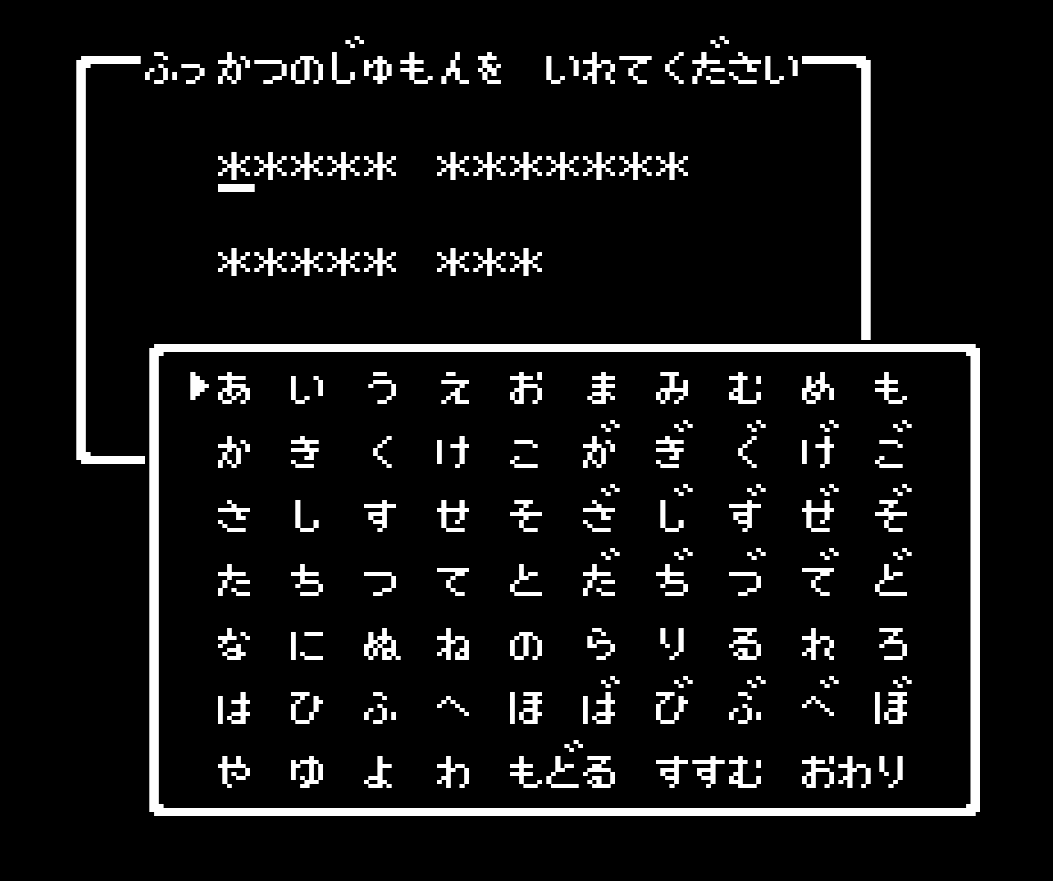
example
cargo run -- -n だい -m save

ぢばげぞでぶいまももれぎざぞでぶいよごぜ
After giving the options explained above and changing the parameters, the Fufutsu no Jumon can be generated.
cargo run -- -n だい -e 7000 -m save

きがよわげずぢなののみやりわげずてだいか
■ Load Mode
Generates a brave man from the "Fukkatsu no Jumon" of fortune.
example
cargo run -- -m load -p ぢばげぞでぶいまももれぎざぞでぶいよごぜ

new_player from Password
player name: た゛い
summary: PlayerSummary { name: "た゛い\u{3000}", level: 1, hp: 14, mp: 0, gold: 0, experience: 0 }
strength_status: StrengthStatus { level: 1, strength: 4, agility: 4, max_hp: 14, max_mp: 0, attack_power: 4, defense_power: 2, weapon: "なし", armor: "なし", shield: "なし" }
■ Display Mode
cargo run -- -m display --view item
[Equipment { name: "なし", price: 0, sell: 0, attack: 0, defense: 0 }, Equipment { name: "たいまつ", price: 8, sell: 4, attack: 0, defense: 0 }, Equipment { name: "せいすい", price: 12, sell: 6, attack: 0, defense: 0 }, Equipment { name: "キメラのつばさ", price: 24, sell: 12, attack: 0, defense: 0 }, Equipment { name: "りゅうのうろこ", price: 20, sell: 10, attack: 0, defense: 2 }, Equipment { name: "ようせいのふえ", price: 0, sell: 0, attack: 0, defense: 0 }, Equipment { name: "せんしのゆびわ", price: 0, sell: 0, attack: 2, defense: 0 }, Equipment { name: "ロトのしるし", price: 0, sell: 0, attack: 0, defense: 0 }, Equipment { name: "おうじょのあい", price: 0, sell: 0, attack: 0, defense: 0 }, Equipment { name: "のろいのベルト", price: 0, sell: 0, attack: 0, defense: 0 }, Equipment { name: "ぎんのたてごと", price: 0, sell: 0, attack: 0, defense: 0 }, Equipment { name: "しのくびかざり", price: 0, sell: 0, attack: 0, defense: 0 }, Equipment { name: "たいようのいし", price: 0, sell: 0, attack: 0, defense: 0 }, Equipment { name: "あまぐものつえ", price: 0, sell: 0, attack: 0, defense: 0 }, Equipment { name: "にじのしずく", price: 0, sell: 0, attack: 0, defense: 0 }]
cargo run -- -m display --view item 5
item: Equipment { name: "ようせいのふえ", price: 0, sell: 0, attack: 0, defense: 0 }
Display Patterns
- item
- weapon
- armor
- shield
- status
- spell
- monster
- town
- dialogue
- map (
--view maplists metadata only,--view map 1shows one map by map id) - tile
- sprite
- tile_sprite
- character
- battle_bg
- talk
- event
- treasure
- encounter
Town / Castle / Shrine
List of towns, castles and shrines. Specify a number (list index, starting from 0) to show one.
cargo run -- -m display --view town
[Town { map_id: 3, name: "ドムドーラ", name_en: "Hauksness", kind: "town", world_entrance: Some((25, 89)), npc_count: 0, dialogue_ids: [] }, Town { map_id: 4, name: "ラダトームのしろ", ... }, ...]
cargo run -- -m display --view town 1
Town { map_id: 4, name: "ラダトームのしろ", name_en: "Tantegel Castle", kind: "castle", world_entrance: Some((43, 43)), npc_count: 20, dialogue_ids: [69, 70, 71, 72, 73, 74, 75, 76, 77, 78, 79, 80, 81] }
Dialogue
List of messages (dialogue). When a number is specified, {player} is replaced with the player name given by
-n. ({word} {number} {wait} are left as they are.)
cargo run -- -m display --view dialogue
["{word}は めをさました\n{wait}", "あなたは しにました", ...]
cargo run -- -n だい -m display --view dialogue 4
た゛いは にじのしずくを
てんに かざした。
▼
Map
Without a number, only the metadata (size, kind, number of NPCs, etc.) of all maps is shown, without tile data. Specify
a map id (1: Alefgard field) to show one map with its tiles (row-major, index = y * width + x) and NPCs.
cargo run -- -m display --view map
[MapSummary { id: 1, name: "アレフガルド", name_en: "Alefgard", kind: "field", width: 120, height: 120, border_tile: 15, npc_count: 0 }, MapSummary { id: 2, name: "りゅうおうのしろ", name_en: "Charlock Castle", kind: "castle", ... }, ...]
cargo run -- -m display --view map 5
GameMap { id: 5, name: "ラダトームのしろ おうのま", name_en: "Tantegel Throne Room", kind: "castle", width: 10, height: 10, border_tile: 21, tiles: [16, 16, 16, ...], npcs: [...] }
Tile
cargo run -- -m display --view tile 3
Tile { id: 3, name: "かいだん(のぼり)", name_en: "stairs_up" }
Map names and tile names use commonly used names.
Talk
What a person in a town does when spoken to. Specify the talk_id of an NPC (--view map <id>) to show one: the kind (weapon shop, item shop, key shop, fairy water shop, inn, message, question, event), the items and prices of a shop, the price of a key / fairy water / one night at the inn, and the role of an event.
cargo run -- -m display --view talk 0
Talk { talk_id: 0, kind: WeaponShop, items: [ShopEntry { item: Weapon(3), name: "どうのつるぎ", price: 180 }, ...], price: None, ... }
Event
The flow of an event conversation (the king, the princess, the Dragonlord, sages, etc.) as a tree of steps: lines, yes / no questions, conditions on the player and actions. Specify the talk_id.
cargo run -- -m display --view event 112
EventScript { talk_id: 112, steps: [Say(199), Say(164), Ask { dialogue_id: 200, ... }] }
Treasure
Treasure chests and items found by searching (kind: Chest / Hidden): position, content, name and the condition under which it is empty. Specify a map id to filter.
cargo run -- -m display --view treasure 5
Treasure { map_id: 5, x: 4, y: 4, kind: Chest, content: Gold { min: 120, max: 120 }, name: None, empty_if: None }
Treasure { map_id: 5, x: 5, y: 4, kind: Chest, content: Item(1), name: Some("たいまつ"), empty_if: None }
Treasure { map_id: 5, x: 6, y: 1, kind: Chest, content: Key, name: Some("かぎ"), empty_if: Some(KeysFull) }
Taken chests come back when you go out to the field, as in the original game.
Encounter
The 20 encounter groups (5 monsters each, chosen with 1/5). Specify a group number to show one. The field is divided into 8 x 8 zones of 15 x 15 tiles, each with its own group. Dungeons have one group per map, and no monsters appear in towns, castles and shrines.
cargo run -- -m display --view encounter 0
0: スライム スライムベス スライム スライムベス スライム
Monster Sprite
Without a number, the metadata (size, position, etc.) of all monster graphics is shown. Specify a monster id to draw the graphic in the terminal (requires a terminal that supports 24-bit color).
cargo run -- -m display --view sprite
[EnemySpriteSummary { id: 0, name: "スライム", mirror: false, x: 128, y: 112, width: 20, height: 19, part_count: 7 }, ...]
cargo run -- -m display --view sprite 0
EnemySpriteSummary { id: 0, name: "スライム", mirror: false, x: 128, y: 112, width: 20, height: 19, part_count: 7 }
(the graphic is drawn here)
Map Tile Sprite / Character Sprite
tile_sprite draws a map tile (16x16) by tile id, side by side in the field, town and dungeon colors. Without a number, the tile list is shown.
cargo run -- -m display --view tile_sprite 3
Some(Tile { id: 3, name: "かいだん(のぼり)", name_en: "stairs_up" })
(the graphic is drawn here)
character draws the two walking frames of a character (16x16) such as the hero, the king or townspeople. Without a number, the character list is shown.
cargo run -- -m display --view character
0: まち の ひと(おとこ) (townsman)
1: せんし (warrior)
...
8: ゆうしゃ (hero)
...
cargo run -- -m display --view character 8
8: ゆうしゃ (hero)
(the graphic is drawn here)
Battle Background
battle_bg draws the battle background of the field (112 x 112). Specify a monster id to draw the monster over it.
cargo run -- -m display --view battle_bg
cargo run -- -m display --view battle_bg 0
(the graphic is drawn here)
The battle mode also draws the battle scene when the monster appears. The battle with りゅうおう takes place in the castle, so it has no background.
■ Battle Mode
Now, if you have given birth to a brave man, let's head into battle.
Enter commands and defeat the slime!
cargo run -- -m battle

スライムがあらわれた!

ゆうてい HP: 15
スライム HP: 3

--- ゆうていのターン ---
コマンド?
1: たたかう
2: じゅもん
3: どうぐ
4: にげる
If you've been hit, then take on the challenge with the best equipment!
cargo run -- -n だい -o max -m battle

スライムがあらわれた!

た゛い  HP: 190
スライム HP: 3

--- た゛い のターン ---
コマンド?
1: たたかう
2: じゅもん
3: どうぐ
4: にげる
You can fight any monster by specifying the id of the enemy in the --view option.
You can fight the last boss right away.
cargo run -- -n だい -o max -m battle --view 39

りゅうおうがあらわれた!

た゛い  HP: 190
りゅうおう HP: 129

--- た゛い のターン ---
コマンド?
1: たたかう
2: じゅもん
3: どうぐ
4: にげる
Beware of strong flames.
 りゅうおうは  ほのおをはいた!
 た゛い は 44ポイントの
 ダメージを うけた

た゛い  HP: 146
りゅうおう HP: 129
■ Explore Mode
Walk around the field, towns and castles. The map around the hero is drawn in the terminal (requires a terminal that supports 24-bit color).
cargo run -- -m explore
| Key | Action |
|---|---|
| ← ↑ ↓ → / W A S D / H J K L | Move |
| q / Esc | Quit |
- You start at the entrance of Tantegel Castle (ラダトームのしろ). Walk off the edge of a town or castle to return to the field.
- Step on a town, castle or cave on the field to enter it. Step on stairs to go up or down.
- Sea, mountains, walls, counters and people cannot be passed.
- A door opens with a key (
--keys). Opened doors close again when you leave the map.
You can also specify the start position with --view <map id> <x> <y> (map ids: --view map).
cargo run -- -m explore --keys 3
cargo run -- -m explore --view 1 43 44
--option or the shortcut -o can be used to specify status options
cargo run -- -o <input>
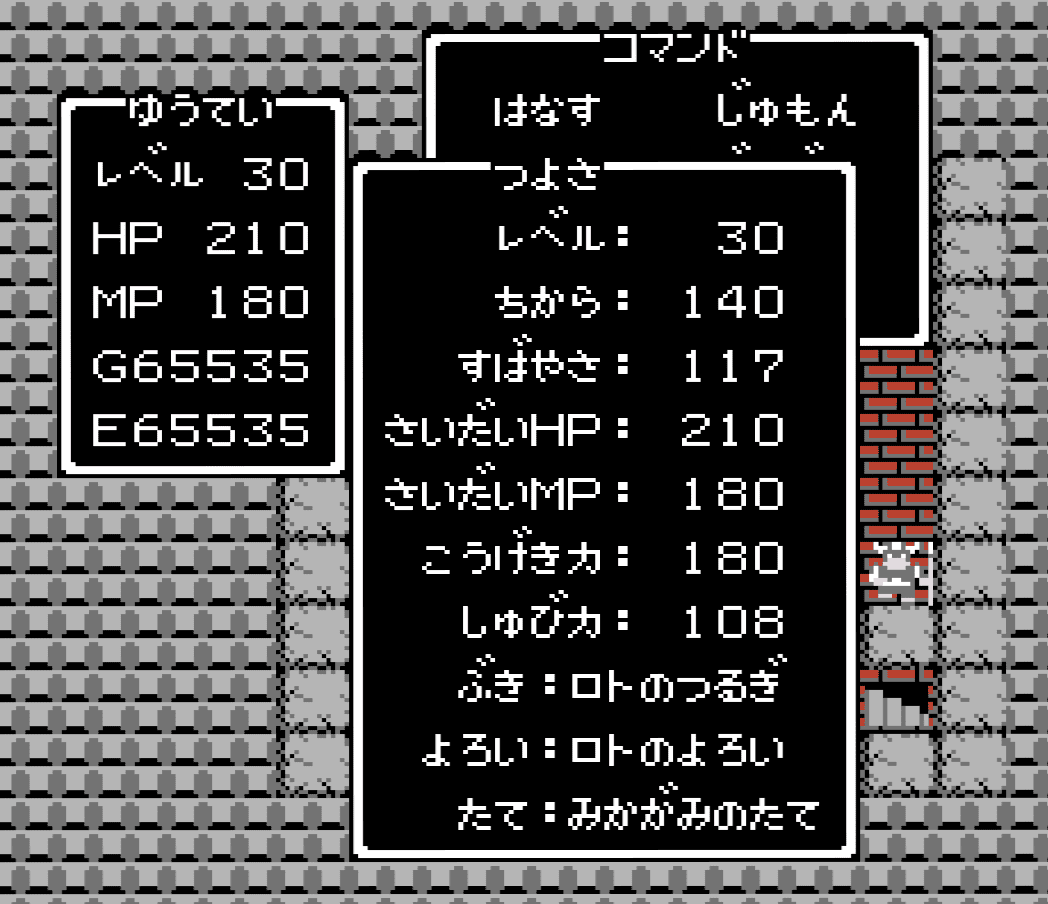
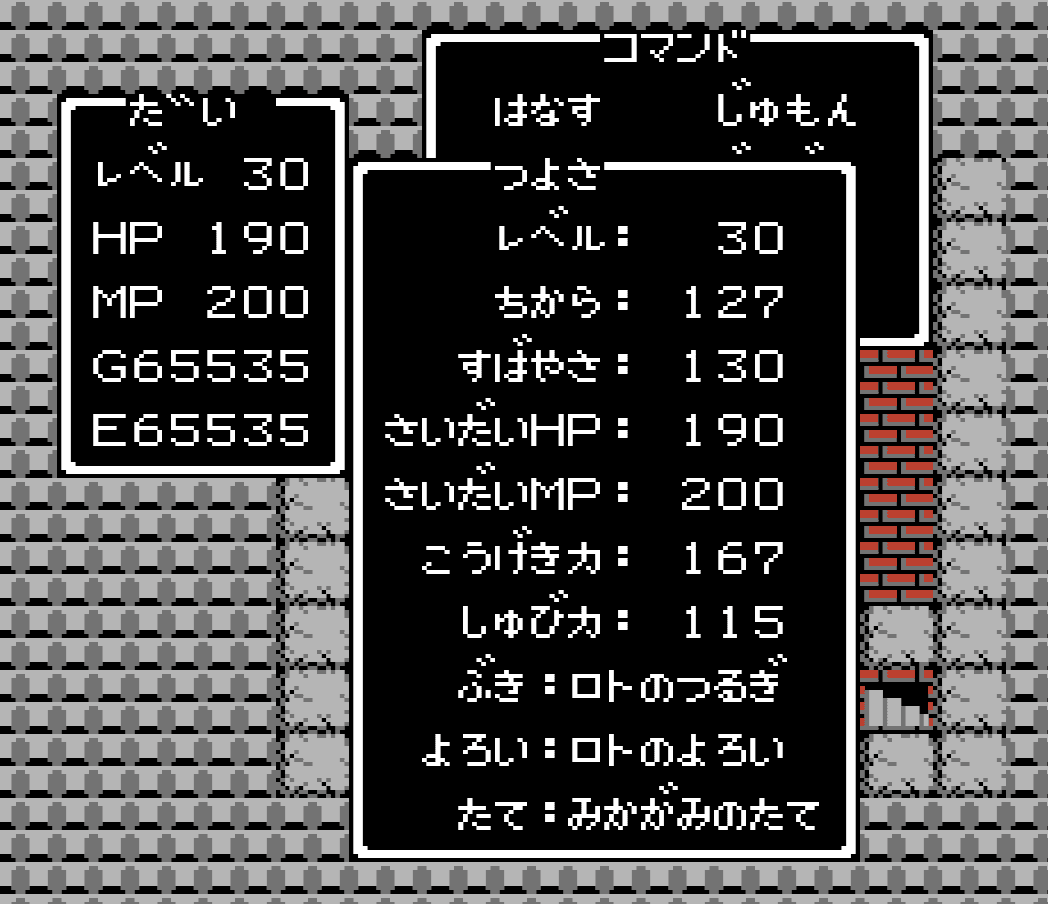
If max is specified, the parameter and story state will be the strongest
example
cargo run -- -o max
player name: ゆうてい
summary: PlayerSummary { name: "ゆうてい", level: 30, hp: 210, mp: 180, gold: 65535, experience: 65535 }
strength_status: StrengthStatus { level: 30, strength: 140, agility: 117, max_hp: 210, max_mp: 180, attack_power: 182, defense_power: 108, weapon: "ロトのつるぎ", armor: "ロトのよろい", shield: "みかがみのたて" }
item: ["りゅうのうろこ", "せんしのゆびわ", "ロトのしるし", "おうじょのあい", "ぎんのたてごと", "たいようのいし", "あまぐものつえ", "にじのしずく"]
The output format can be changed by giving the --format.
cargo run -- --format <input>
| Format Name | Description |
|---|---|
| It will be a print statement output. This is the default setting. | |
| json | Output in JSON format |
- Alefgard - A site built with Damdara (WebAssembly)
To contribute to Damdara, follow these steps:
- Fork this repository.
- Create a branch:
git checkout -b <branch_name>. - Make your changes and commit them:
git commit -m '<commit_message>'. - Push your changes to your branch:
git push origin <branch_name>. - Create a pull request.
Alternatively, consult the GitHub documentation on how to create a pull request.
- 名前による成長率タイプの変化
- DQ1の「ふっかつのじゅもん」の仕組みを全解説
- 復活の呪文を解析してみたよ
- ふっかつのじゅもんって何?基本の使い方から仕組み・原理まで、動画一本で全てわかる!【FC】【ゆっくり解説】
- ドラゴンクエスト 攻略・解析
- ドラゴンクエスト (FC) 復活の呪文計算機
- 主人公の名前と能力成長の基礎 FCDQ1
- DQ1(FC版)強さ判断プログラム
This project is licensed under the MIT License. See the LICENSE file for details.
All monsters, images and other copyrights belong to Square Enix.
Daisuke Takayama