




A high-performance, Go-based Model Context Protocol (MCP) daemon (mcpd) designed to securely bridge AI agents directly with the Linux operating system.
This project implements a zero-dependency (kernel-first) philosophy. It allows AI agents to introspect and interact with the host Linux system directly via raw syscalls and the Virtual File System (/proc, /sys) without requiring bloated third-party parsing libraries.
Communication happens directly between the AI agent and the daemon via Server-Sent Events (SSE) and JSON-RPC over HTTPS on port 9091 (TLS is on by default, with a self-signed certificate generated on first start).
An AI agent that helps run a server needs to see it - load, memory, disks, processes, services, logs, the network - and sometimes to act on it. The usual way is an SSH shell, and a shell is everything at once: any command, any file the account can reach, with sudo all of root, and hard to tell afterwards what was done. mcpd gives the agent typed tools instead of a shell:
- Diagnose without a shell. "Why is the site slow?" -
processes/top,memory/usage,disks/usage,logs/journal-control,logs/dmesg,network/connections,services/listanswer it, with structured output (json/yaml) the agent doesn't have to scrape fromtopordf. - Root per tool, not per session. A user runs every tool as its own OS account; root is granted per tool in
mcp-sudo.yamland limited by paths, network destinations and sysctl keys - "may read/var/logas root and restart services" rather than "is root". - One agent, one account, one token. Each agent gets its own user, and every call is logged with the user, tool, arguments (secrets redacted) and result - an audit trail of what the agent did.
- Small and self-contained. One static Go binary, reading
/proc,/sysand systemd over D-Bus itself; it runs on a bare host, in Docker or in Kubernetes, andlinuxctlgives people the same tools as a kubectl-like CLI.
Grant carefully. A root grant is root for an agent that follows instructions found in what it reads. Some grants that look narrow are full root (writes to
/etc,services/manage, sysctl writes). Read Permissions and Risks before granting anything.
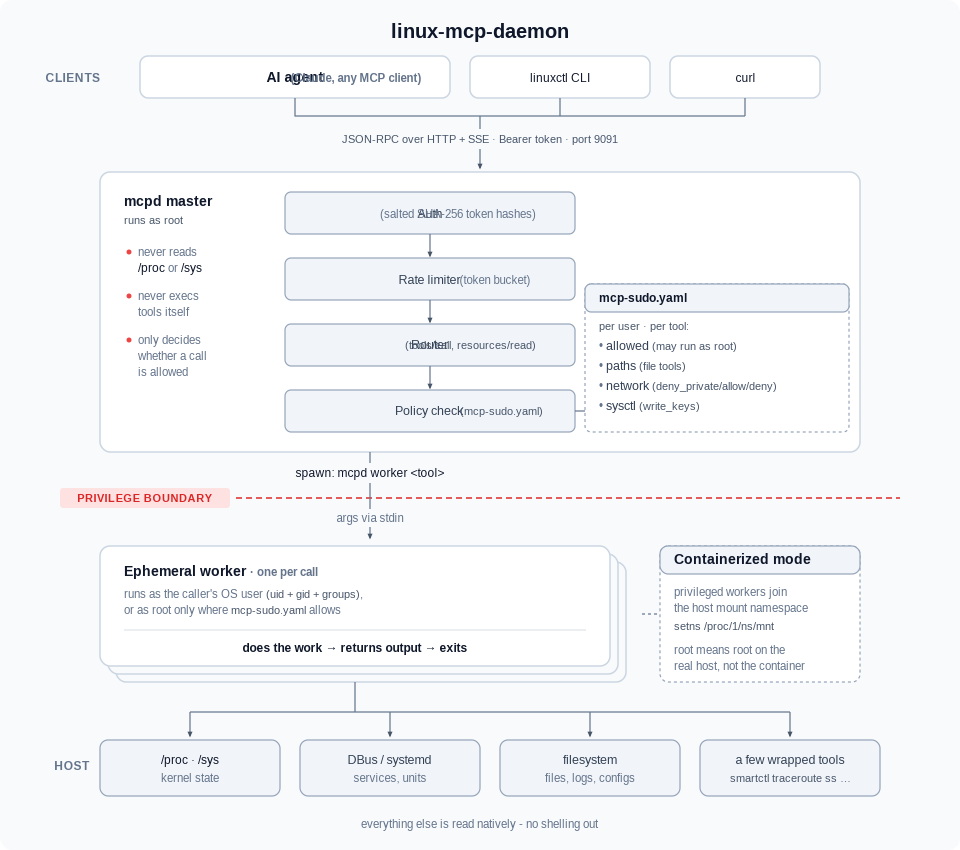
- Every tool/resource call spawns a fresh worker process and exits. There's no long-lived state per call -
internal/worker/spawner.gore-execs themcpdbinary itself inworkermode (arguments on stdin, never argv), withsyscall.Credential{Uid, Gid, Groups}set to a real OS account resolved viauser.Lookup(). This is the actual privilege isolation, not a config flag: an unprivileged user's worker process is a genuinely different Linux UID than a privileged one's. configs/mcp-sudo.yamldecides, per user and per tool, whetherprivileged: trueis honored. Two grants exist for resources specifically (seeARCHITECTURE.md's gotcha section) - one for the resource URI itself, one for the internal worker tool name behind it.- When
mcpdruns containerized (configs/daemon.yaml'sworker.containerized: true, this project's actual Kubernetes deployment), a privileged worker also joins the real host's mount namespace (setns(CLONE_NEWNS)on/proc/1/ns/mnt, no externalnsenterbinary) - soprivileged: truemeans root on the real host, not just root inside the daemon's own container image. - Bearer tokens are salted+hashed in
users.yaml(token_salt+token_hash,sha256, constant-time compared; the file is0600), not stored in plaintext. Users and grants are edited only locally, on the host, vialinuxctl <verb> mcpd userandlinuxctl edit mcpd config(validated likevisudo) - there is no MCP tool that edits them, so nothing with just a bearer token can grant itself anything. The running daemon applies changes without a restart throughdaemon/reload-config, which only re-reads the files and rejects invalid ones (see Daemon User Administration). - Every read is schema-driven, not hand-listed.
linuxctlfetchestools/list/resources/list/resources/templates/listfrom the live daemon on every invocation and resolves its<verb> <group> [keyword]grammar against that - a new tool added server-side is immediately usable client-side with zero code changes.
- Direct AI Interaction: HTTP/SSE transport for immediate agent-to-daemon communication.
- Strict Security: Rate limiting, salted+hashed Bearer token authentication, and directory traversal protection.
- Privilege Separation: Master daemon runs as root, spinning up ephemeral unprivileged/privileged workers based on rules defined in
configs/mcp-sudo.yaml. - High Performance: Uses
singleflightdeduplication and TTL caching for efficient system introspection. - Docker & Kubernetes Ready: Fully containerized with a multi-stage Docker build and Kubernetes deployment manifests that allow safe host introspection.
curl -fsSL https://raw.githubusercontent.com/nucleusv/linux-mcp-daemon/main/scripts/install.sh | sudo bashNeeds sudo and curl on an amd64/arm64 host (in a bare ubuntu/debian container: apt update && apt install -y curl ca-certificates, then pipe to bash as root). This downloads the latest release for your architecture (amd64/arm64), verifies its sha256 checksum, installs mcpd and linuxctl to /usr/local/bin, writes clean configs to /etc/mcpd/configs (no default users or tokens), creates a first user mcp and prints its token once, and starts the mcpd systemd service. Then:
export MCP_SERVER=https://127.0.0.1:9091
export MCP_TLS_FINGERPRINT=<printed by the installer>
export MCP_TOKEN=<token printed by the installer>
linuxctl get system os-release
linuxctl get processes top- Upgrade: run the same command again - configs are kept, the service restarts only if
mcpdchanged. From v0.1.0, grant your first userdaemon/reload-configonce - see Upgrading. - Pin a version / name the user:
... | sudo bash -s -- --version v0.1.0 --user alice - More users: each needs an OS account of the same name - see Adding more users.
- Uninstall:
... | sudo bash -s -- --uninstall(add--purgeto delete/etc/mcpd; themcpOS account stays -sudo userdel -r mcp) - Packages:
.deband.rpmfor amd64/arm64 on every release -sudo apt install ./linux-mcp-daemon_<version>_amd64.deborsudo dnf install ./linux-mcp-daemon-<version>-1.x86_64.rpm, then the next steps it prints. - Container image:
ghcr.io/nucleusv/linux-mcp-daemon(amd64/arm64) - setup steps in the installation docs. - macOS (CLI only): the same script installs just
linuxctl-curl -fsSL .../install.sh | bash -s -- --bin-dir ~/.local/bin, thenexport PATH="$HOME/.local/bin:$PATH"(not on macOS's default PATH) - to drive a remote mcpd.
mcpd listens on all interfaces over TLS (a self-signed certificate it creates on first start; clients pin its fingerprint). Plain HTTP is off by default - bearer tokens would travel in clear text. Root access for tools is granted per user and per tool in
mcp-sudo.yaml.
Full guide: Installation · Connect an AI agent · mcp-sudo.yaml
-
Build the Docker image:
./scripts/build.sh
-
Deploy to your local Kubernetes cluster:
./scripts/deploy.sh
You can build the CLI client directly on your host machine (e.g. macOS):
./scripts/build-cli.sh                  # writes executables/linuxctl
export PATH="$PWD/executables:$PATH"   # so the examples below run as written
Installed from a release (install.sh, .deb/.rpm), linuxctl is already on your PATH.
The daemon runs on port 9091. You can connect via your AI client using SSE, or use the linuxctl CLI tool:
# Set your token as an environment variable
export MCP_TOKEN="your_token_here"

# Ping the daemon
linuxctl ping
linuxctl speaks a small verb/group grammar (linuxctl <verb> <group> [target-keyword] [args]) and dynamically discovers every tool and resource from the running daemon - there's no separate client-side command list to keep in sync. Full reference: linuxctl docs or man linuxctl. Every example below shows both forms: linuxctl, and the raw MCP JSON-RPC curl call it resolves to - the full per-tool/resource reference with these side by side for every single one lives at MCP API docs.
mcpd speaks JSON-RPC 2.0 over HTTP + SSE, not plain request/response HTTP - every call is a two-step handshake: open an SSE stream to get a one-time POST endpoint, then POST the JSON-RPC request there (the actual result streams back on the SSE connection, not in the POST's response body):
# 1. Open the SSE stream in the background and capture the endpoint it prints
curl -N -s --cacert mcpd.crt -H "Authorization: Bearer $MCP_TOKEN" https://localhost:9091/sse &
# server sends: event: endpoint / data: /message?session_id=...

# 2. POST a request to that endpoint
curl -s --cacert mcpd.crt -X POST "https://localhost:9091/message?session_id=<from step 1>" \
  -H "Authorization: Bearer $MCP_TOKEN" \
  -H "Content-Type: application/json" \
  -d '{"jsonrpc": "2.0", "id": "1", "method": "tools/list"}'

# 3. Watch the SSE stream from step 1 for the matching "id": "1" response
Every example below follows this exact pattern - only the -d payload changes.
# List a directory, as a table (get is the sole read verb - one result or many, same as kubectl)
$ linuxctl get files list /var/log --output table
MODIFIED              NAME               SIZE     IS_DIR
2026-09-22 18:38:14   alternatives.log   6522     false
2026-09-22 18:38:10   apt                4096     true
...
curl -s -X POST "$ENDPOINT" -H "Authorization: Bearer $MCP_TOKEN" -H "Content-Type: application/json" \
-d '{"jsonrpc":"2.0","id":"1","method":"tools/call","params":{"name":"files/list","arguments":{"path":"/var/log","output_format":"table"}}}'# Read a single file's contents (bare - no keyword needed, files' only other read candidate)
linuxctl get files /etc/hostscurl -s -X POST "$ENDPOINT" -H "Authorization: Bearer $MCP_TOKEN" -H "Content-Type: application/json" \
-d '{"jsonrpc":"2.0","id":"1","method":"tools/call","params":{"name":"files/read","arguments":{"path":"/etc/hosts"}}}'# Read a static resource directly by URI (resource URIs always use scheme://path)
$ linuxctl resource os://uname
Sysname: Linux
Nodename: desktop-control-plane
Release: 7.0.12-linuxkit
...curl -s -X POST "$ENDPOINT" -H "Authorization: Bearer $MCP_TOKEN" -H "Content-Type: application/json" \
-d '{"jsonrpc":"2.0","id":"1","method":"resources/read","params":{"uri":"os://uname"}}'# Native partition geometry - parsed from /sys/class/block, no fdisk dependency
linuxctl get disks partitions vda --output jsoncurl -s -X POST "$ENDPOINT" -H "Authorization: Bearer $MCP_TOKEN" -H "Content-Type: application/json" \
-d '{"jsonrpc":"2.0","id":"1","method":"tools/call","params":{"name":"disks/partitions","arguments":{"device":"vda","output_format":"json"}}}'# Run a privileged tool (requires a root rule in configs/mcp-sudo.yaml)
linuxctl get disks free / --privileged truecurl -s -X POST "$ENDPOINT" -H "Authorization: Bearer $MCP_TOKEN" -H "Content-Type: application/json" \
-d '{"jsonrpc":"2.0","id":"1","method":"tools/call","params":{"name":"disks/free","arguments":{"path":"/","privileged":true}}}'# Same underlying tool - bare form lists many, a specific PID filters to one
linuxctl get processes --sort_by mem --limit 5
linuxctl get processes 1234curl -s -X POST "$ENDPOINT" -H "Authorization: Bearer $MCP_TOKEN" -H "Content-Type: application/json" \
-d '{"jsonrpc":"2.0","id":"1","method":"tools/call","params":{"name":"processes/list","arguments":{"pid":1234}}}'# Rich aggregated detail (combines several reads, excludes secret-shaped data like environ)
linuxctl describe processes 1234# describe aggregates multiple resources/read calls client-side - e.g. one of them:
curl -s -X POST "$ENDPOINT" -H "Authorization: Bearer $MCP_TOKEN" -H "Content-Type: application/json" \
-d '{"jsonrpc":"2.0","id":"1","method":"resources/read","params":{"uri":"process://1234/status"}}'# journalctl only exists on the host, never in this daemon's own image
linuxctl get logs journal --unit kubelet.service --boot true --privileged truecurl -s -X POST "$ENDPOINT" -H "Authorization: Bearer $MCP_TOKEN" -H "Content-Type: application/json" \
-d '{"jsonrpc":"2.0","id":"1","method":"tools/call","params":{"name":"logs/journal-control","arguments":{"unit":"kubelet.service","boot":true,"privileged":true}}}'linuxctl restart system services nginx.service --privileged true
linuxctl update kernel sysctl net.ipv4.ip_forward 1 --privileged truecurl -s -X POST "$ENDPOINT" -H "Authorization: Bearer $MCP_TOKEN" -H "Content-Type: application/json" \
-d '{"jsonrpc":"2.0","id":"1","method":"tools/call","params":{"name":"services/manage","arguments":{"service":"nginx.service","action":"restart","privileged":true}}}'Talks to the Docker Engine API over its socket - no docker CLI needed. Every docker/* tool needs its own grant in mcp-sudo.yaml; the ones that name a container also need a containers: list, so an agent only touches the containers you list.
linuxctl get docker containers --all true          # running and stopped
linuxctl get docker images
linuxctl get docker network bridge                 # one network's full configuration
linuxctl get docker container web-1 status         # computed runtime summary (state, health, uptime, limits)
linuxctl resource docker-container://web-1/stats   # the same templates by URI: docker-container://, docker-image://, docker-volume://, docker-network://
linuxctl get docker logs web-1 --lines 50

# needs docker/manage and docker/exec grants that list web-1
linuxctl restart docker web-1
linuxctl exec docker web-1 ls /usr/share/nginx/html
linuxctl exec docker web-1 -- ls --color /etc # after `--` everything goes to the container as-isRead, list and replace crontabs with the crontab command's own rules (cron.allow/cron.deny still apply). Writing a crontab schedules commands as that user, and the job survives the end of the session and the revocation of the token - read the crontab risks before you grant it.
linuxctl get crontabs                                  # my own crontab, exactly as `crontab -l` prints it
linuxctl update crontabs --content "$(cat mycron.txt)" # replace my whole crontab
linuxctl edit crontabs                                 # open it in $EDITOR, write back if unchanged meanwhile

# another user's crontab: sudo plus a rule naming that account in mcp-sudo.yaml
linuxctl get crontabs --privileged true                # the users you may view that have a crontab
linuxctl get crontabs test_user --privileged true
linuxctl update crontabs test_user --privileged true --content "$(cat test_user.cron)"linuxctl get mcp-api info # raw initialize response: protocol version + declared capabilities
linuxctl get mcp-api tools # every tool, by literal name
linuxctl get mcp-api resources # every static resource + template
linuxctl get mcp-api prompts # reports plainly that mcpd doesn't implement this MCP capabilitycurl -s -X POST "$ENDPOINT" -H "Authorization: Bearer $MCP_TOKEN" -H "Content-Type: application/json" \
-d '{"jsonrpc":"2.0","id":"1","method":"initialize","params":{"protocolVersion":"2024-11-05","capabilities":{},"clientInfo":{"name":"curl","version":"1.0"}}}'linuxctl tool files/list --path /tmp # symmetric with `resource <uri>` abovecurl -s -X POST "$ENDPOINT" -H "Authorization: Bearer $MCP_TOKEN" -H "Content-Type: application/json" \
-d '{"jsonrpc":"2.0","id":"1","method":"tools/call","params":{"name":"files/list","arguments":{"path":"/tmp"}}}'linuxctl create mcpd user alice # generates a token, prints it once, writes to configs/*.yaml directly
linuxctl list mcpd usersThere's no curl equivalent for this group - see Daemon User Administration for why it's deliberately kept off the network entirely.
cmd/mcpd/: Main server application entrypoint.cmd/linuxctl/: The CLI client application.configs/: Configuration files (Daemon config, Sudo rules).internal/: Encapsulated business logic:auth/: Per-user rate limiting.config/:daemon.yaml,users.yamlandmcp-sudo.yamlparsing and validation (shared by mcpd andlinuxctl).rpc/: MCP JSON-RPC handlers - tool/resource registry, authorization, config reload.worker/: Spawns each call as a short-lived worker under the caller's OS account (or root).tools/,resources/: One package per tool and resource.fsafe/: Opening paths without following symlinks (openat with O_NOFOLLOW).kernel/,procstat/: Parsing/proc(sockets, processes).logging/: Leveled, structured logging.netpolicy/: Network destination policy fornetwork/curlandnetwork/ping.
k8s/: Kubernetes deployment manifests.scripts/: Build and deployment automation.
Pushing a SemVer tag (git tag -a v0.1.0 -m v0.1.0 && git push origin v0.1.0) runs .github/workflows/release.yml: tests, then GoReleaser publishes per-platform archives, checksums.txt and a changelog to GitHub Releases, and a multi-arch image to ghcr.io/nucleusv/linux-mcp-daemon.
Apache License 2.0 - see also NOTICE.
