


You already know role-based authorization in ASP.NET Core:
[Authorize(Roles = "Administrator")]
public class AdministrationController : Controller
{
}
But what if you don't want to hard-code roles, and want to create roles later and decide what each one can access, without touching the source code?
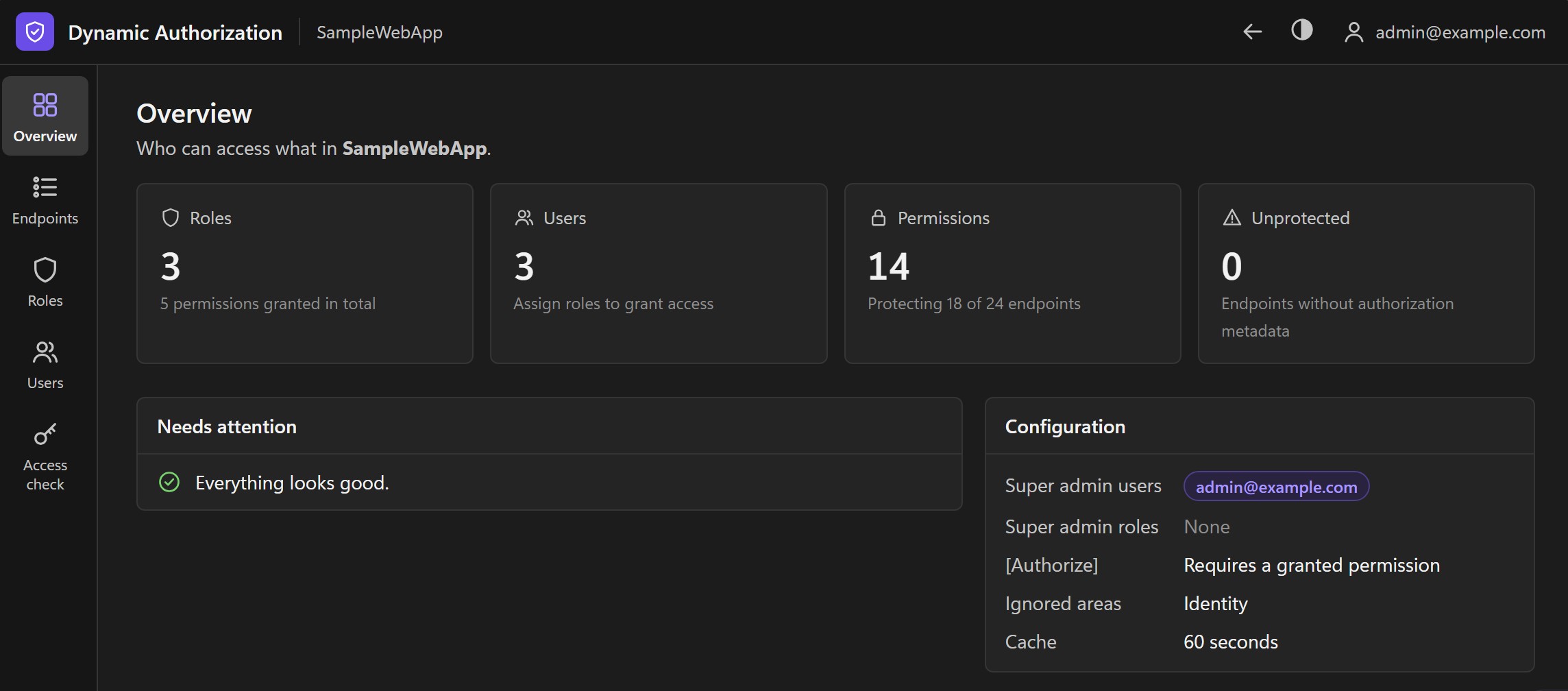
Dynamic Authorization turns every [Authorize] endpoint into a permission that you grant to roles at runtime:
- Works with MVC controllers, Razor Pages and Minimal APIs, without changing your
[Authorize]attributes. - Stores permissions in your ASP.NET Core Identity database with Entity Framework Core (any provider).
- Ships a dashboard to manage roles, permissions and user roles, and to assign authorization policies to resources.
- Runs on multiple instances with a cache shared through
HybridCache.
- Packages
- Getting started
- How it works
- Customizing permissions
- Assigning policies to resources
- Showing content only to users who may access it
- Dashboard
- Caching and multiple instances
- Options
- Upgrading
- Building
- License
| Package | Description |
|---|---|
DynamicAuthorization.AspNetCore |
Permission discovery, the authorization handler, the secure-content tag helper and IPermissionChecker. |
DynamicAuthorization.AspNetCore.EntityFrameworkCore |
Stores role permissions in your Identity DbContext, with any EF Core provider. |
DynamicAuthorization.AspNetCore.Dashboard |
A Razor Pages dashboard to manage roles, user roles and the policies assigned to resources, inspect endpoints and check access. |
DynamicAuthorization.AspNetCore.HybridCache |
Caches user roles and role permissions in HybridCache, shared between instances through a distributed cache. |
Version 2 targets .NET 10 and .NET 11. Version 1.x (DynamicAuthorization.Mvc.*) remains available for older
frameworks; see Migrating from 1.x.
dotnet add package DynamicAuthorization.AspNetCore.EntityFrameworkCore
dotnet add package DynamicAuthorization.AspNetCore.Dashboardpublic class ApplicationDbContext(DbContextOptions<ApplicationDbContext> options) : IdentityDbContext(options)
{
protected override void OnModelCreating(ModelBuilder builder)
{
base.OnModelCreating(builder);
builder.EnableDynamicAuthorization(); // adds the AspNetRolePermissions table
}
}Any context that derives from IdentityDbContext with roles works, including custom user and role types, other key types
(int, Guid, ...) and contexts that inherit through your own base class. Then add a migration:
dotnet ef migrations add AddDynamicAuthorizationbuilder.Services
.AddIdentity<IdentityUser, IdentityRole>() // roles are required
.AddEntityFrameworkStores<ApplicationDbContext>();
builder.Services
.AddDynamicAuthorization(options => options.SuperAdminUsers.Add("admin@example.com"))
.AddEntityFrameworkStore<ApplicationDbContext>()
.AddDashboard();
var app = builder.Build();
app.UseAuthentication();
app.UseAuthorization();
app.MapRazorPages();
app.MapControllers();
app.MapDynamicAuthorizationDashboard(); // https://your-app/authzThat's it: every endpoint protected by [Authorize] now requires a permission, such as orders.read or orders.update.
Sign in as the super admin, open /authz, create roles, choose their permissions and assign them to users.
samples/SampleWebApp protects
Razor Pages, an MVC area and Minimal APIs, uses SQLite with migrations, registers two policies admins can assign to
resources (BusinessHours and CompanyAccounts), and seeds three demo accounts (the password is in appsettings.json):
dotnet run --project samples/SampleWebApp --framework net11.0 --launch-profile httpThe sample targets .NET 10 and .NET 11, so dotnet run needs --framework; use net10.0 to run it on .NET 10.
Permissions are named {resource}.{operation}:
- The resource comes from the controller (and its area), the Razor Pages folder, or the Minimal API route.
- The operation is
read,create,updateordelete, or a custom operation such asarchive.
| Endpoint | Permission |
|---|---|
OrdersController.Index, .Details, any other [HttpGet] action |
orders.read |
OrdersController.Create (GET and POST) |
orders.create |
OrdersController.Edit (GET and POST) |
orders.update |
OrdersController.Delete (GET and POST) |
orders.delete |
[HttpPost] OrdersController.Archive |
orders.archive |
[Area("Admin")] ReportsController.Index |
admin.reports.read |
/Orders/Index and /Orders/Details pages |
orders.read |
/Orders/Edit page, OnGet and OnPost |
orders.update |
/Orders/Index page, OnPostArchive handler |
orders.archive |
GET /api/orders, GET /api/orders/{id} |
orders.read |
POST /api/orders |
orders.create |
PUT or PATCH /api/orders/{id} |
orders.update |
DELETE /api/orders/{id} |
orders.delete |
POST /api/orders/{id}/ship |
orders.ship |
A few rules follow from this:
- Endpoints with the same resource share its permissions.
orders.readgrants the read actions ofOrdersController, the pages in/OrdersandGET /api/ordersalike. - Areas are part of the resource:
[Area("Admin")] ReportsControllerisadmin.reports. Minimal APIs can have an area too; see Permission-checking only some APIs. - A Minimal API's resource is the first route segment after
apiand a version segment, so/api/v2/ordersisorderstoo. - Controllers are identified by their area and name, not their namespace, so renaming or moving a namespace keeps the granted permissions. Two controllers with the same name in the same area are therefore rejected; see Controllers with the same name.
- Any operation implies read. A role granted
orders.updatecan also open the pages that requireorders.read, such as the list that links to the edit form. SetOperationsImplyRead = falseto require read explicitly. - Razor Page handlers are authorized separately.
OnPostArchiveon the orders page requiresorders.archivealthoughOnGetonly requiresorders.read.
The first rule that matches wins:
- An override:
[Permission(...)],.RequirePermission(...)or.RequirePermissionOperation(...). - The name of the action, page, page handler or endpoint (
WithName):Index,Details,ListandGet…mean read;Create,Add…,New…andPost…create;Edit,Update…,Put…andPatch…update;Delete…andRemove…delete. - The HTTP method, when it is unambiguous: GET means read, PUT and PATCH update, DELETE delete, and a POST to a collection
(
POST /api/orders) create. - Otherwise, the operation is named after the action, page handler or last route segment:
POST Orders/Approverequiresorders.approve. A POST is never guessed to be a create.
With the default options, the permission check is added to ASP.NET Core's default authorization policy. Every endpoint
protected by a plain [Authorize], RequireAuthorization() or AuthorizeFolder() requires a permission, with no
attribute changes.
What is not permission-checked:
[AllowAnonymous]endpoints.[Authorize(Roles = "...")]or[Authorize(Policy = "...")]without a plain[Authorize]: you already chose static authorization for those.- Endpoints marked
[IgnoreDynamicAuthorization]or.IgnoreDynamicAuthorization(), and areas listed inIgnoredAreas(Identityby default, so the Identity UI account pages stay available), including Minimal API areas set withWithPermissionArea. They still require a signed-in user.
Good to know:
RequireDynamicAuthorization()requires the permission even whenApplyToDefaultPolicyis disabled.- Your own policies are permission-checked when they include the requirement:
options.AddPolicy("Managers", p => p.RequireRole("Manager").AddRequirements(new DynamicPermissionRequirement()))requires the role and the endpoint's permission. Inline policies passed toRequireAuthorization(policy)replace the default policy, as in ASP.NET Core, so they are permission-checked only when they include the requirement. - The fallback policy can require an explicit permission (
new DynamicPermissionRequirement("app.access")) but not the permission of the endpoint: endpoints without authorization metadata have none, and startup fails with an explanation. - A SignalR hub is one endpoint, although
MapHubmaps two:MapHub<ChatHub>("/chat").RequireAuthorization()requireschat.accessfor the hub and for/chat/negotiate, which clients call first. - Razor runtime compilation is supported. Its pages are compiled when they are first described, for example when the dashboard lists the endpoints, rather than on their first request, because only a compiled page has its authorization, page model attributes and handlers.
Super admins have every permission, which lets you bootstrap the first administrator before any role exists:
options.SuperAdminUsers.Add("admin@example.com"); // by username
options.SuperAdminRoles.Add("Administrators");    // members of these roles
Super admin roles can't be renamed or deleted from the dashboard, and the last member of a super admin role can't be removed when no super admin user is configured.
[Permission("orders.approve")]                        // an explicit permission
public IActionResult Approve(int id) { ... }

[HttpPost]
[Permission(Operation = PermissionOperation.Update)]  // the derived resource with another operation: orders.update
public IActionResult Reopen(int id) { ... }

[PermissionResource("sales-orders", DisplayName = "Sales orders")]  // another resource for the whole controller
public class OrdersController : Controller { ... }

app.MapPost("/api/orders/{id}/approve", Approve).RequirePermission("orders.approve");
app.MapPost("/api/orders/{id}/reopen", Reopen).RequirePermissionOperation(PermissionOperation.Update);
app.MapGroup("/api/v1/sales").WithPermissionResource("orders");
app.MapGroup("/api/admin").WithPermissionArea("admin");              // like [Area("Admin")]: admin.orders, admin.users, ...
[Permission] also works on page handler methods, for example on OnPostApprove.
With WithPermissionResource, a POST to the route segment named after the resource is a create, however many segments
come before it: POST /api/legacy/orders in a group with WithPermissionResource("admin.orders") requires
admin.orders.create.
To check permissions only on some endpoints, such as the admin APIs, and leave the others to plain [Authorize], turn
off ApplyToDefaultPolicy and require dynamic authorization where you want it. Put the admin endpoints in an area so
that they get permissions of their own:
builder.Services.AddDynamicAuthorization(options => options.ApplyToDefaultPolicy = false);

RouteGroupBuilder client = app.MapGroup("/api/client")
    .RequireAuthorization();                                        // any signed-in user
client.MapGet("/orders", ...);

RouteGroupBuilder admin = app.MapGroup("/api/admin")
    .RequireDynamicAuthorization()                                  // a granted permission
    .WithPermissionArea("admin");
admin.MapGet("/orders", ...);
admin.MapPost("/orders", ...);
Map the endpoints on the returned groups: an endpoint mapped on app gets none of a group's authorization, even with
the same URL prefix.
| Endpoint | Permission |
|---|---|
GET /api/admin/orders |
admin.orders.read |
POST /api/admin/orders |
admin.orders.create |
POST /api/admin/orders/{id}/ship |
admin.orders.ship |
DELETE /api/admin/users/{id} |
admin.users.delete |
GET /api/v2/admin/orders, GET /api/admin/v2/orders |
admin.orders.read |
How Minimal API areas work:
- Without the area, every admin endpoint would belong to one
adminresource, andadmin.readwould grant reading everything under/api/admin. - The area's segment is skipped when it starts the route, after
apiand any version segment, so all versions share a permission. A later segment with the area's name is kept, so an action likePOST /api/orders/{id}/adminin a group at/api/ordersstill requiresadmin.orders.admin. - Case and separators don't matter:
BackOfficematches/api/backofficeand/api/back-office. - An area works like
[Area("Admin")]on a controller:[Area("Admin")] OrdersControllerand/api/admin/ordersshare theadmin.orderspermissions and the policies assigned to that resource, andIgnoredAreasapplies to both. WithPermissionResourcereplaces the whole resource, area included.
You can also keep ApplyToDefaultPolicy and exclude the client APIs with .IgnoreDynamicAuthorization() instead. Turning
the default off is safer: a new endpoint is never permission-checked by accident, only by asking for it.
Adding an area to existing endpoints moves them to new resources: /api/admin/orders moves from admin to
admin.orders.
- With the CRUD convention their permissions change too, and the dashboard lists the old grants as no longer matching
anything. With
PermissionConvention.Endpointthe grants still match. - Under either convention, the policies assigned to the old resource stop applying to them at once, because a resource
without assignments has no extra restrictions. Assign the policies to each new resource before the remapped endpoints
serve requests. The dashboard and
IResourcePolicyManagementServiceonly accept resources the running application has, so either store the assignments throughIResourcePolicyStoreahead of the deployment and invalidate the cache, or keep the remapped endpoints unexposed until they are in place.
To grant each action, page and route individually instead, use the endpoint convention:
options.Convention = PermissionConvention.Endpoint;Permissions are then named mvc:{area}:{controller}:{action} (mvc::Orders:Edit), page:{area}:{page}
(page::/Orders/Edit), and endpoint:{name} or endpoint:{methods} {route} (endpoint:GET /api/orders). All handlers of
a page share its permission.
Because controllers are identified by their area and name, two controllers with the same name in the same area, such as
Admin.WidgetsController and Client.WidgetsController without [Area], would be the same resource: granting a
permission, or assigning a policy, for one would apply to the other, including the read access that any operation
implies. Instead, the application fails to start and names the controllers, and requests to them are denied should such a
controller be added at runtime.
To fix it, do one of the following:
- Put them in different areas with
[Area]. Areas that only differ in case or hyphens, such asBackOfficeandBack-Office, are the same resource. - Rename one of them.
- Give each a resource of its own with
[PermissionResource].
To share permissions on purpose, for example between versions of an API, every one of the controllers must opt in:
- Declare the same resource on each:
[PermissionResource("widgets")]. - Use an explicit key,
[Permission("widgets.read")], on actions that require a permission of another resource. - With the endpoint convention, permissions don't depend on the resource, so sharing ones also need
[Permission("key")]on the actions of each controller.
The dashboard names resources after the controller's [DisplayName] (or its name), the page folder or the Minimal API tag.
Set [PermissionResource(..., DisplayName = "...")] to rename one. Custom operations take the action's [DisplayName]:
[Authorize, DisplayName("Orders")]
public class OrdersController : Controller
{
    [HttpPost, DisplayName("Approve orders")]
    public IActionResult Approve(int id) { ... }
}Declare permissions that are not bound to an endpoint, and check them with IPermissionChecker, the tag helper, or a
policy. Name them {resource}.{operation} to list them with their resource in the dashboard:
builder.Services.AddDynamicAuthorization(options => options.AddPermission("orders.export", "Export orders"));

if (await permissionChecker.HasPermissionAsync(User, "orders.export")) { ... }

builder.Services.AddAuthorization(options =>
options.AddPolicy("CanExport", policy => policy.AddRequirements(new DynamicPermissionRequirement("orders.export"))));Instead of hard-coding [Authorize(Policy = "...")] on pages and endpoints, let admins assign your authorization
policies to resources in the dashboard. Every request to a permission-checked endpoint of the resource must then pass the
assigned policies, in addition to its permission. Policies stay defined in code; only their assignment changes at
runtime, without a redeploy.
Declare which policies admins may assign, and enable the table that stores the assignments:
builder.Services.AddAuthorizationBuilder()
    .AddPolicy("BusinessHours", policy => policy.AddRequirements(new BusinessHoursRequirement()))
    .AddPolicy("RequireMfa", policy => policy.RequireClaim("amr", "mfa"));

builder.Services
    .AddDynamicAuthorization(options =>
    {
        options.AddAssignablePolicy("BusinessHours", "Business hours", "Monday to Friday, 8:00 to 18:00.");
        options.AddAssignablePolicy("RequireMfa", "Multi-factor sign-in");
    })
    .AddEntityFrameworkStore<ApplicationDbContext>()
    .AddDashboard();

// In OnModelCreating, then add a migration:
modelBuilder.EnableDynamicAuthorization(o => o.ResourcePolicies = true); // adds the AspNetResourcePolicies table
The table is opt-in, so applications that don't assign policies have nothing to migrate. Admins then choose each resource's policies on the dashboard's Policies page, which exists only while a policy is assignable.
How assigned policies are applied:
- Per resource. A policy assigned to
ordersapplies to every permission-checked endpoint of the resource: theOrdersControlleractions, the/Orderspages and/api/orders, whatever the operation. The resource is the endpoint's own (its controller, page folder or route, or[PermissionResource]), not the resource of the permission it requires:[Permission("reports.export")]on anOrdersControlleraction is guarded by the policies oforders. - All must pass. Every assigned policy must succeed, like stacked
[Authorize(Policy = ...)]attributes. Assignments never grant a permission; they only add restrictions. - Super admins skip them, without the assignments even being read, so they keep access if the store is unavailable.
Super admins are the way back in if a policy can never pass. The dashboard's own resources (
authz.*) take policies only while a super admin user or role is configured, and their policies are skipped if a later configuration has none, so nobody can be locked out of it. - Requests only. Assigned policies apply when a request is authorized. Endpoints that are not permission-checked
(
[AllowAnonymous],[IgnoreDynamicAuthorization], ignored areas, or protected only by roles or named policies) and explicit permissions (new DynamicPermissionRequirement("orders.export")) are not affected, and neither areIPermissionCheckerand thesecure-contenttag helper: a link can be shown for a page that an assigned policy denies. - Names, not schemes. Policies are resolved by name through the
IAuthorizationPolicyProvider, so a custom provider can supply them. A policy with authentication schemes, or one that itself requires a dynamic permission, cannot be assigned: it would mean something else when evaluated after the permission, so it denies if it shows up anyway. An endpoint protected by a named policy that only a custom provider knows is treated as statically protected and gets no assigned policies. - Removing a registration. A stored assignment of a policy that is no longer registered with
AddAssignablePolicyis skipped (with a warning in the log and on the Overview page), and enforced again if the policy is registered again. During a rolling deployment, instances with different registrations can therefore enforce different policies. A registered policy that the provider cannot find denies.
Assigned policies receive the authorization resource the request was authorized with (the HttpContext, or an MVC
filter context), as they would on the endpoint itself.
Managing assignments in code. Use IResourcePolicyManagementService to change them, or call
IDynamicAuthorizationCache.InvalidateResourcePoliciesAsync after changing the store yourself; to store them elsewhere,
implement IResourcePolicyStore. Assignments are cached like role permissions, as one entry, and the management service
invalidates it when they change. Replacing a resource's policies runs in a serializable transaction: of two concurrent
edits, the last to commit wins, and on some providers the other fails with a serialization error and can be saved again.
Add the tag helper in _ViewImports.cshtml:
@addTagHelper *, DynamicAuthorization.AspNetCoreThen wrap content in secure-content. Pages and actions are evaluated with their complete authorization policy, exactly as the
request would be, so links to anonymous pages are always shown and links to role-protected pages are shown to role members:
<secure-content asp-page="/Orders/Index">
    <a asp-page="/Orders/Index">Orders</a>
</secure-content>

<secure-content asp-area="Admin" asp-controller="Reports" asp-action="Index">
    <a asp-area="Admin" asp-controller="Reports" asp-action="Index">Reports</a>
</secure-content>

<secure-content asp-page="/Orders/Index" asp-page-handler="Archive">
    <button form="archive">Archive</button>
</secure-content>

<secure-content asp-permission="orders.export">
    <button>Export</button>
</secure-content>The dashboard is a set of Razor Pages served under /authz, styled after the .NET Aspire dashboard, with light and dark themes.
It has no JavaScript or CSS dependencies and works with a strict Content Security Policy.
- Overview: roles, users, permissions and unprotected endpoints, plus what needs attention: endpoints without authorization, roles without users, and granted permissions that no longer match anything (for example after renaming an action).
- Endpoints: every page, action and Minimal API with its route, protection, permission and the roles that can access it.
- Roles: create, rename and delete roles, and choose their permissions in a resources × operations matrix (read, create, update, delete and custom operations), with a filter and an unsaved-changes counter.
- Policies: assign authorization policies to resources (see Assigning policies to resources). Shown only while a policy is assignable.
- Users: search users, assign roles, and see each user's effective permissions and which role grants them.
- Access check: pick a user and a permission to see whether access is granted, and why.
.AddDashboard(options =>
{
    options.RoutePrefix = "admin/access";      // default: "authz"
    options.Title = "Contoso access control";
    options.AuthorizationPolicy = "Admins";    // default: the dynamic authorization policy
    options.UserSearch = UserSearchMatch.Contains; // default: StartsWith, which the Identity indexes can answer
});By default, the dashboard is protected by permissions like any other part of the application:
| Permission | Allows |
|---|---|
authz.overview.read, authz.endpoints.read, authz.access.read |
The Overview, Endpoints and Access check pages. |
authz.roles.read |
Viewing roles. |
authz.roles.create, authz.roles.update, authz.roles.delete |
Managing roles and their permissions. |
authz.users.read, authz.users.update |
Viewing users and assigning their roles. |
authz.policies.read, authz.policies.update |
Viewing and changing the policies assigned to resources. These exist only while a policy is assignable (AddAssignablePolicy), like the Policies page. |
You can let a role view roles without letting it change them, or manage roles without managing users; navigation and buttons only show what the user may do.
Treat the role and user permissions as administrator access: whoever can edit roles can grant themselves any permission.
The users page, like IUserManagementService.GetUsersAsync, matches the search text at the start of the username and email
address by default (UserSearchMatch.StartsWith). That becomes LIKE 'TEXT%' on the normalized columns, which Identity
indexes, so the count and the page can seek the indexes instead of reading every user. Whether the database does depends
on the collation of the two columns:
- SQL Server seeks the Identity indexes as they are.
- SQLite compares
LIKEwithout regard to case, so its indexes must do the same: giveNormalizedUserNameandNormalizedEmailtheNOCASEcollation, as the sample does. - PostgreSQL cannot use a B-tree index for
LIKEunder a linguistic collation: give the two columns theCcollation, or add an index with thevarchar_pattern_opsoperator class.
builder.Entity<IdentityUser>(user =>
{
    user.Property(u => u.NormalizedUserName).UseCollation("NOCASE"); // "C" on PostgreSQL
    user.Property(u => u.NormalizedEmail).UseCollation("NOCASE");
});
Add a migration after changing the collation. UserSearchMatch.Contains finds the text anywhere but reads every user on
each search, whatever the collation.
User roles and role permissions are cached for CacheDuration (one minute by default), in the memory of the instance unless
you share the cache.
- Changes made through the dashboard or the management services apply immediately on the instance that made them.
- Other instances, and changes made elsewhere (for example with
UserManager.AddToRoleAsync), see the change when the cache expires. CallIDynamicAuthorizationCache.InvalidateUserAsync/InvalidateRoleAsyncafter changing roles in your own code, or setCacheDurationtoTimeSpan.Zeroto disable caching. - When you call the management services inside your own transaction, invalidate the affected role or user (or call
InvalidateAllAsync) after committing: the services cannot see when your transaction completes.
Concurrent requests for the same user or role share one load, and a change made while a load is in progress is never hidden by it. Loads run in a service scope of their own, outside any ambient transaction, so they read committed data only and never depend on the request that started them.
Within one request, the roles of the user and the permissions of those roles are resolved once, however many
secure-content tags and permission checks the request makes, and no longer than the cache keeps them: a scope that
outlives a request, for example one held by a background service, sees changes made elsewhere when the cache does.
With more than one instance, cache the data in HybridCache on a distributed cache instead, so that every instance reads
the same entries and an invalidation on one instance reaches the others. Install DynamicAuthorization.AspNetCore.HybridCache,
register a distributed cache, and call UseHybridCache():
builder.Services.AddStackExchangeRedisCache(options => options.Configuration = "localhost:6379");

builder.Services
    .AddDynamicAuthorization()
    .AddEntityFrameworkStore<ApplicationDbContext>()
.UseHybridCache();UseHybridCache()registersHybridCachewith its defaults when the application has not; configure it withservices.AddHybridCache(options => ...)if you need to.- Entries live in the distributed cache for
CacheDurationand in the memory of each instance forLocalCacheDuration(five seconds by default,UseHybridCache(o => o.LocalCacheDuration = ...)). - An invalidation writes a marker to the cache, for the user or role or for everything, and removes the entry from the
distributed cache. Every read compares an entry with the markers, so the other instances see the invalidation within
LocalCacheDuration, and a load that was running on any instance when it happened is not kept. HybridCachereads one key at a time, so the permissions of roles that are not cached are loaded one role at a time; each load is shared by every instance that reads the role.- Keys and tags start with
KeyPrefix(dynamic-authorization:by default). Applications that share a distributed cache but not their users and roles must use different prefixes.
To use another cache, implement IDynamicAuthorizationCacheStore and register it before AddDynamicAuthorization(), or
replace the registration afterwards. The interface documents the contract permission checks rely on: concurrent reads of
one key share one load, an invalidation during a load discards its result, failed loads are not kept, and a load runs to
completion when the caller that started it is cancelled. The cache tests in the repository run against every
implementation. Implement IResourcePolicyCacheStore as well to cache the policies assigned to
resources; otherwise they are cached in the memory of each instance.
The permissions of roles that are not cached are loaded with one store call: the Entity Framework store runs one query,
and a custom IPermissionStore can implement GetPermissionsAsync(IEnumerable<string> roleIds, ...) to do the same.
| Option | Default | Description |
|---|---|---|
SuperAdminUsers |
empty | User names that have every permission. |
SuperAdminRoles |
empty | Roles whose members have every permission. |
Convention |
Crud |
Crud: one permission per resource and operation (orders.read). Endpoint: one per action, page or route. |
OperationsImplyRead |
true |
Any operation on a resource also grants {resource}.read. |
ApplyToDefaultPolicy |
true |
Permission-check every endpoint that uses the default policy (plain [Authorize]). |
IgnoredAreas |
Identity |
Areas that only require a signed-in user. |
CacheDuration |
1 minute | How long user roles and role permissions are cached. |
Permissions / AddPermission |
empty | Permissions that are not bound to an endpoint. |
AssignablePolicies / AddAssignablePolicy |
empty | Authorization policies admins may assign to resources. |
EnableDynamicAuthorization(o => { o.TableName = "..."; o.Schema = "..."; }) customizes the table;
o.ResourcePolicies = true adds the table of the policies assigned to resources (o.ResourcePolicyTableName).
| 1.x | 2.x |
|---|---|
DynamicAuthorization.Mvc.Core |
DynamicAuthorization.AspNetCore |
DynamicAuthorization.Mvc.JsonStore, DynamicAuthorization.Mvc.MsSqlServerStore |
DynamicAuthorization.AspNetCore.EntityFrameworkCore |
DynamicAuthorization.Mvc.Ui |
DynamicAuthorization.AspNetCore.Dashboard |
AddDynamicAuthorization<TDbContext>(o => o.DefaultAdminUser = "...") |
AddDynamicAuthorization(o => o.SuperAdminUsers.Add("...")) + .AddEntityFrameworkStore<TDbContext>() |
.AddJsonStore() / .AddSqlServerStore(...) |
.AddEntityFrameworkStore<TDbContext>() and modelBuilder.EnableDynamicAuthorization() |
.AddUi(mvcBuilder), /role, /userrole |
.AddDashboard() + app.MapDynamicAuthorizationDashboard(), /authz |
class MyTagHelper : SecureContentTagHelper<TDbContext, ...> |
Remove it; use @addTagHelper *, DynamicAuthorization.AspNetCore |
IMvcControllerDiscovery |
IPermissionCatalogProvider |
IRoleAccessStore |
IPermissionStore, IRoleManagementService |
1.x granted roles individual actions. After adding the migration, import them once at startup, after the endpoints are
mapped. Each action is granted the permissions its endpoints require today, for example orders.update for Orders/Edit.
Imports are idempotent, merge with existing permissions and skip roles that no longer exist:
// From the 1.x JSON store file. For the 1.x SQL Server store's RoleAccess table, read through your DbContext,
// call ImportDynamicAuthorizationV1SqlServerStoreAsync() instead.
DynamicAuthorizationV1ImportResult result = await app.Services.ImportDynamicAuthorizationV1JsonStoreAsync("RoleAccess.json");

foreach (string widened in result.WidenedAccess)
{
    app.Logger.LogWarning("Review: {Widened}", widened);
}
CRUD permissions can grant more than a 1.x action did: a role that could open Orders/Index but not Orders/Details gets
orders.read, which covers both. WidenedAccess lists every such case (for example
Editors: orders.read also grants mvc::Orders:Details), and UnmatchedActions lists 1.x actions that no longer exist. With
Convention = PermissionConvention.Endpoint, roles get exactly their 1.x actions.
Version 2 also authorizes Razor Pages and Minimal APIs: Razor Pages protected with [Authorize] (including the Identity UI if
you removed Identity from IgnoredAreas) now require permissions too.
A POST to the route segment named after a WithPermissionResource resource is now a create (see
Overriding the convention). Review two sets of grants before rollout:
- Such a POST used to require
{resource}.{last segment}(admin.orders.orders) when the route had more than one segment besidesapiand the version. Roles that had it lose the POST until they are granted{resource}.create, and the dashboard's Overview lists the old grant as no longer matching anything. - Roles that already have
{resource}.creategain the POST, and grantingcreateto holders of the old permission also opens every other endpoint that requires it.
To keep the old boundary, require the old permission explicitly: .RequirePermission("admin.orders.orders").
dotnet build DynamicAuthorization.slnx
dotnet test --solution DynamicAuthorization.slnx
CI also fails on code that differs from .editorconfig. Check it with the first command and fix what it reports with
the second:
dotnet format DynamicAuthorization.slnx --verify-no-changes
dotnet format DynamicAuthorization.slnx