Repository navigation
Feature Request: Multiple Locations / Timezones in Calendar Applet #9221
Description

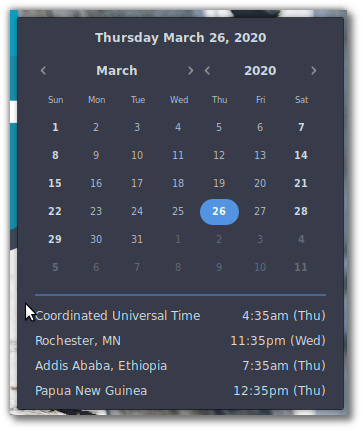
The calendar@simonwiles.net applet has not been actively maintained in several years. I am not reporting a bug here about that, but rather am making a feature request for the stock calendar@cinnamon.org applet to include multiple timezone functionality.
This feature goes way back to Gnome2 and is not intrusive to users that would not use it, but having multiple locations / timezones viewable right from the calendar applet is very useful for users interacting with others around the globe.
Thanks for your consideration! Screenshot is from calendar@simonwiles.net under Cinnamon 4.2.x in Mint 19.x / Ubuntu 18.04.x:
Reacted by Denis Boulas, Michael Turko, Thomas, Tom Lejeune and janos-r
Activity
[-]Feature Request: World Clocks in Calendar Applet[/-][+]Feature Request: Multiple Locations / Timezones in Calendar Applet[/+]dene14 commentedon Jan 9, 2022
Well, this one feature prevents me from switching to in-stock calendar applet which now got an event integration... Adding that feature would definitely make
calendar@cinnamon.orgthe best time/calendar applet ever.mtwebster commentedon Jan 10, 2022
You mean simply to show multiple timezones as shown in the pic above? Does this include being able to select one and have event times update to reflect the different perspective?
rik-shaw commentedon Jan 19, 2022
@mtwebster the Simon Wiles applet doesn't do fancy things like have the timezones clickable to change to them and have event times update from the clicked timezone, etc. It only displays the current time in different timezones. It does need a GUI to enter additional timezones to show. Here is the Simon Wiles one for example:
Right-click clock in panel, note option to "Edit World Clocks":
"World Clock Calendar" GUI:
After you "ADD" a new Clock, it by default comes in with a "Display Name" of "Coordinatued Universal Time" and a timezone of "UTC". You click to edit "Display Name", and to change timezone you click "UTC" and it brings up the selection dialog matching as you type, like this when I typed "Ad" to find Addis Ababa, for example:
dene14 commentedon Jan 19, 2022
@mtwebster and this is how it looks when you click on your clocks
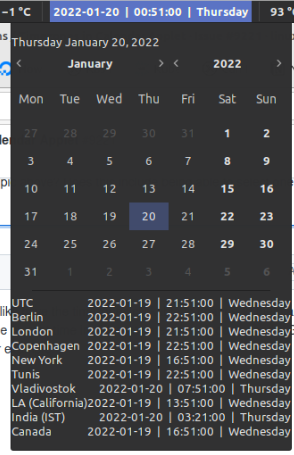
so as @rik-shaw mentioned, nothing extremely fancy about it - you enter name and timezone and it produces the output with date format you set in configuration. But this extremely useful when you work with people/branches across the world.
dene14 commentedon Feb 10, 2023
Can somebody please look into this?
Th0masL commentedon Nov 17, 2025
Can we have an update on this ticket ?
janos-r commentedon Nov 22, 2026
This already exists.
Already over 3y ago I commented on "Calendar with public Holidays" (https://cinnamon-spices.linuxmint.com/applets/view/329)
that it's main feature (despite it's name) is that it combines
I highly recommend people use that one.
And I wish this official mint calendar app would copy this. More users deserve this simple feature (to see what time it is abroad).
janos-r commentedon Nov 22, 2026
No, that is not necessary. Just to click and see the other place's time is good enough.
Just so we don't have to remember time differences, winter times, and count on our fingers ourselves.
As commented above, this is from the current "Calendar with public Holidays" which does this perfectly. Just port it to the main app so that it is not so hidden from the users.