This is a little repo for my bookmarklet projects.
Right now the only thing worth noting is my Github pixel drawing bookmarklet that turns any Github commit calendar into a simple little pixel editor with a few colors!
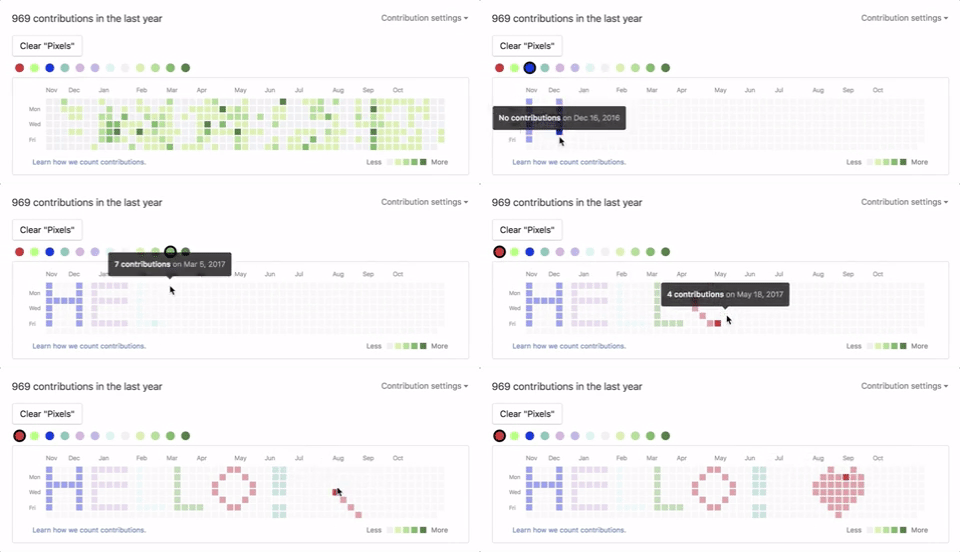
To try it out yourself you can make a bookmark using the following "url":
javascript:(function()%7Blet%20contribGraph%20%3D%20document.querySelector('.mb-5.border.border-gray-dark.rounded-1.py-2')%3Bif%20(window.location.host%20!%3D%3D%20%22github.com%22)%20%7Balert(%60Seems%20lik%20you're%20on%20%24%7Bwindow.location.host%7D%2C%20not%20GitHub.com%20%E2%80%94%20you%20need%20to%20be%20on%20a%20GitHub%20user's%20page%20for%20this%20bookmarklet%20to%20work%20properly.%60)%7D%20else%20if%20(!contribGraph)%20%7Balert(%22Couldn't%20find%20the%20GitHub%20contribution%20calendar%2C%20you%20need%20to%20be%20on%20a%20GitHub%20user's%20page%20for%20this%20bookmarklet%20to%20work%20properly.%22)%7Dlet%20colors%20%3D%20%5B%20'%23FF0000'%2C%20'%2300FF00'%2C%20'%230000FF'%2C%20'%232EAFAC'%2C%20'%23DAD'%2C%20'%23BAE'%2C%20'%23BEE'%2C%20'%23eee'%2C%20'%23c6e48b'%2C%20'%237bc96f'%2C%20'%23239a3b'%2C%20'%23196127'%5D%3Blet%20calendar%20%3D%20document.querySelector('.js-calendar-graph-svg')%3Blet%20currentColor%20%3D%20colors%5B0%5D%3Blet%20clearBtn%20%3D%20document.createElement('button')%3BclearBtn.innerHTML%20%3D%20'Clear%20%22Pixels%22'%3BclearBtn.style%20%3D%20%60position%3A%20relative%3B%20display%3A%20inline-block%3B%20margin%3A%201%25%200%3B%20padding%3A%206px%2012px%3B%20font-size%3A%20%24body-font-size%3B%20font-weight%3A%20%24font-weight-bold%3B%20line-height%3A%2020px%3B%20white-space%3A%20nowrap%3B%20vertical-align%3A%20middle%3B%20cursor%3A%20pointer%3B%20user-select%3A%20none%3B%20background-repeat%3A%20repeat-x%3B%20background-position%3A%20-1px%20-1px%3B%20background-size%3A%20110%25%20110%25%3B%20border%3A%201px%20solid%20transparentize(%24black%2C%200.8)%3B%20border-radius%3A%200.25em%3B%20appearance%3A%20none%3B%60%3Bfunction%20clearPixels()%20%7B%5B...columns%5D.filter(el%20%3D%3E%20%7Breturn%20el.tagName%20%3D%3D%3D%20'g'%7D).forEach(column%20%3D%3E%20%7B%5B...column.children%5D.forEach(square%20%3D%3E%20%7Bsquare.setAttribute('fill'%2C%20'%23EEE')%3B%7D)%7D)%7DclearBtn.addEventListener('click'%2C%20clearPixels)%3BcontribGraph.parentNode.insertBefore(clearBtn%2C%20contribGraph)%3Blet%20legend%20%3D%20document.createElement('ul')%3Blegend.classList%20%2B%3D%20'legend'%3Bcolors.forEach(color%20%3D%3E%20%7Blet%20square%20%3D%20document.createElement('li')%3Bsquare.setAttribute('data-color'%2C%20color)%3B%2F*%20This%20is%20the%20laziest%20version%20of%20implementing%20GitHub's%20Primer%20styleguide%2C%20at%20least%20it%20gets%20rid%20of%20some%20defaultshttps%3A%2F%2Fgithub.com%2Fprimer%2Fprimer%2Fblob%2Fmaster%2Fmodules%2Fprimer-buttons%2Flib%2Fbutton.scss%20*%2Fsquare.style%20%3D%20%60display%3A%20inline-block%3B%20width%3A%2020px%3B%20height%3A%2020px%3B%20margin%3A%200%202px%3B%20background-color%3A%20%24%7Bcolor%7D%3B%20border%3A%203px%20solid%20white%3B%20border-radius%3A%2050%25%3B%60%3Bif%20(currentColor%20%3D%3D%3D%20color)%20%7Bsquare.style%5B'border-color'%5D%20%3D%20'black'%3B%7Dsquare.addEventListener('click'%2C%20()%20%3D%3E%20%7Bif%20(currentColor%20!%3D%3D%20color)%20%7Blet%20currentEl%20%3D%20document.querySelector(%60li%5Bdata-color%3D'%24%7BcurrentColor%7D'%5D%60)%3BcurrentEl.style%5B'border-color'%5D%20%3D%20'white'%3BcurrentColor%20%3D%20color%3BcurrentEl%20%3D%20document.querySelector(%60li%5Bdata-color%3D'%24%7Bcolor%7D'%5D%60)%3BcurrentEl.style%5B'border-color'%5D%20%3D%20'black'%3B%7D%7D)%3Blegend.appendChild(square)%3B%7D)%3BcontribGraph.parentNode.insertBefore(legend%2C%20contribGraph)%3Blet%20columns%20%3D%20calendar.children%5B0%5D.children%3B%5B...columns%5D.filter(el%20%3D%3E%20%7Breturn%20el.tagName%20%3D%3D%3D%20'g'%7D).forEach(column%20%3D%3E%20%7Bcolumn.addEventListener('click'%2C%20evt%20%3D%3E%20%7Blet%20index%20%3D%20colors.indexOf(evt.target.getAttribute('fill'))%3B%2F*%20This%20was%20before%20there%20was%20a%20palette%20...evt.target.setAttribute('fill'%2C%20colors%5B(index%20%2B%201)%20%25%20colors.length%5D)%20*%2Fconsole.log(%22currentColor%3A%22%2C%20currentColor)%3Bevt.target.setAttribute('fill'%2C%20currentColor)%3B%7D)%7D)%7D)()
met-library/ wraps library.metmuseum.org
(Watsonline, the Sierra WebPAC catalog of the Thomas J. Watson Library) in a
phone-first UI: a big search box with Everything / Title / Author / Subject
scopes, clean result cards with availability and call numbers, a record sheet,
a bag you fill up, and a guided checkout that walks through Watsonline's
own request flow for every item in the bag (sign in once, pick a pickup
location, submit, next). There's also an account sheet for checkouts and holds.
It is meant to be launched from the iOS Shortcuts app: paste
docs/met-library/shortcut.js into a "Run JavaScript on Web Page" action and
run it from Safari's share sheet on Watsonline. It also works as a plain Safari
bookmarklet. Install instructions, copy buttons and the built bookmarklet
links live on the docs page: https://cwervo.github.io/bookmarklets/met-library/
How it works: the script runs on library.metmuseum.org, fetches the
catalog's own HTML (same origin), and re-renders it. Signing in and placing
requests happen on the real Watsonline pages inside a sheet with mobile CSS,
so no credentials ever touch anything but the Met's own site. Your bag and
recent searches are kept in Safari's local storage for that site.
Building it (no dependencies; terser is used to minify if it's resolvable):
node met-library/build.js
This regenerates docs/met-library/ (index.html, app.js for the loader
bookmarklet, shortcut.js for iOS Shortcuts, and the encoded bookmarklet
links). The loader bookmarklet expects this repo's docs/ folder to be served
by GitHub Pages at https://cwervo.github.io/bookmarklets/.
Colors every word of a Wikipedia article by the date it was added
(source in wikipedia-edit-history-colors/source.js).
The ramp is ROYGBV from the article's first edit to its newest one, with lightness
climbing from black to white along the way so the order still reads in grayscale or
with color blindness (there are also Mono and Ink modes, and a reverse button).
Spaces are never colored. Hover a word for the date range it was added in, and
triple-click or triple-tap a word to pinpoint the exact revision and open a
60%-inset popup showing that section as it was then, centered on that word.
It only talks to Wikipedia's own API (same origin, no third-party service), so it works on every language edition. History is sampled at evenly spaced points in time plus adaptive extra samples, each word is dated to the earliest sample that contains it next to one of its neighbours, and triple-clicking binary-searches the revisions in between for the exact edit.
Grab the bookmarklet from the docs page, which also has a tiny loader variant for browsers that reject long bookmark URLs. Rebuild the docs page and the hosted script with:
cd wikipedia-edit-history-colors && node build.js
To compile the bookmarklet to an HTML escaped, function-wrapped line of JavaScript:
bookmarklet script.js out.js
To compile the bookmarklet docs:
bookmarklet source.js -d > ../docs/${PWD##*/}/index.html
# note, if that fails you may need to run:
mkdir ../docs/${PWD##*/}