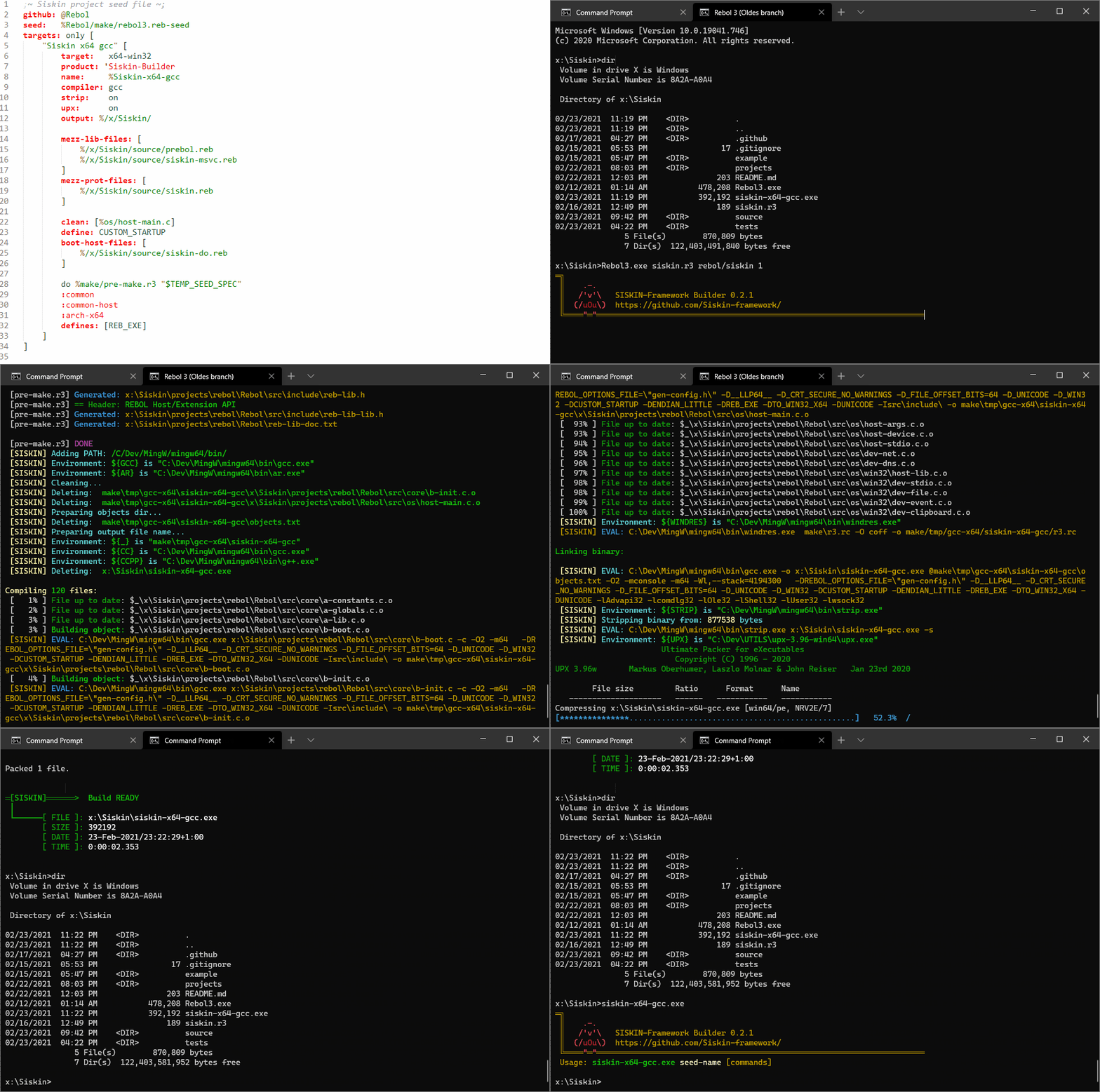
Siskin is a small command-line build tool written in Rebol 3. It compiles C/C++/Objective-C projects described in a simple Rebol-based file called a nest. It was born to build Rebol itself, but works for any native project — libraries, tools, Rebol extensions, compression utilities…
It can compile directly (gcc, clang, tcc, emcc…), or generate a Visual Studio, Xcode or Makefile project and build through that.
- Key ideas: nests and eggs
- Running Siskin
- Interactive mode
- Command-line options
- Writing a nest
- Nest reference
- Pre-build commands and actions
- Environment variables
- What happens during a build
- Tips & troubleshooting
- A nest (
*.nestfile) describes a project: where sources live, which compiler to use, flags, defines, libraries, git repositories to fetch, and so on. - An egg is one build target inside a nest — for example release, debug, x86, x64, or library vs executable.
- Settings at the top of a nest are shared; each egg inherits them and adds or overrides its own.
my-project.nest
 ├── shared settings (compiler, sources, includes…)
 └── eggs
      ├── 1: "Release x64"
      ├── 2: "Debug x64"
      └── 3: "Static library"
siskin <nest> [options...] [targets...]Siskin is available as a compiled executable, or you can run the script with a Rebol 3 interpreter (siskin --help / the script's --help prints the exact form for your setup).
You don't need to type the full path. For siskin foo, Siskin tries, in order:
foo
foo.nest
foo/.nest
./foo/foo.nest
./tree/foo.nest
./tree/foo/foo.nest
./projects/foo.nest
./projects/foo/foo.nest
A target can be given as:
- the egg's number (as shown by
--list, starting at 1), - the egg's title (
"Release x64"), - or the egg's
name:value.
Several targets may be built in one call:
siskin rebol 1 2 3
siskin rebol --clean "Release x64"
Options placed before a group of targets apply to that group.
Run Siskin with just the nest name and it lists the eggs and waits for commands:
siskin my-project

Found eggs:
  1:  Release x64
  2:  Debug x64

Egg command: 1
In interactive mode you type options without dashes:
| Command | Meaning |
|---|---|
1, 2, "Release x64" |
Build that egg |
clean 1 |
Rebuild egg 1 from scratch |
run 1 |
Build and run the result |
msvc 1 / xcode 1 / make 1 |
Build via a generated project |
list |
List eggs again |
help |
Show options |
q or quit |
Exit |
If you edit the nest file between commands, Siskin notices and reloads it automatically.
When the
CIenvironment variable istrue, interactive mode is disabled and any failing command ends Siskin with a non-zero exit code.
Short options can be combined: -cr 1 means --clean --run 1.
| Short | Long | Description |
|---|---|---|
-c |
--clean |
Remove cached results (object files) before building |
-d |
--debug |
Maximum verbosity and debug messages |
-h |
--help |
Show available options |
-o |
--output <path> |
Put the result here instead of the default location |
-q |
--quiet |
Minimal output |
-l |
--list |
List all targets (eggs) in the nest |
-r |
--run |
Run the built program right after building |
-t |
--test |
Dry run — show what would happen without doing it |
-u |
--update |
git pull linked repositories before building |
-v |
--verbose |
More output (vv, vvv, vvvv in interactive mode for more levels) |
-V |
--version |
Show version and quit |
--msvc |
Generate a Visual Studio project and build with it | |
--xcode |
Generate an Xcode project and build with it | |
--make |
Generate a Makefile and build with it | |
--git-ssh |
Clone GitHub repositories over SSH (password-protected key) | |
--no-upx |
Skip UPX compression even if the nest asks for it | |
--gzip |
Also produce a .gz compressed copy of the result |
|
--no-comp |
Skip compiling/linking (run only the other steps) | |
--script <file> |
Just evaluate a Rebol script (and quit) | |
--platform <name> |
Pretend to be another platform (system/platform) |
|
--arch <arch> |
Override target architecture (e.g. x86, x64, arm64) |
|
--cc <name|path> |
Use a different compiler | |
--cflags "<flags>" |
Extra compiler flags | |
--lflags "<flags>" |
Extra linker flags | |
--cppflags "<flags>" |
Extra C++-only compiler flags | |
--define <def> |
Extra preprocessor define (FOO or FOO=1) |
|
--undefine <name> |
Remove a define (wins over everything else) |
Examples:
# Build egg 2 and run it
siskin hello -r 2

# Clean build with extra flags, result copied to ./dist/
siskin hello --clean --cflags "-Wall -Wextra" --output dist/ 1

# Try clang instead of the nest's compiler
siskin hello --cc clang 1

# Build via Visual Studio
siskin rebol --msvc 1A nest is a Rebol block — no header needed. Here is a small but complete example:
;; hello.nest
compiler: gcc
source:   %src/
include:  %src/include/
define:   USE_COLORS
optimize: 2

eggs: [
	"Hello (release)" [
		name:  "hello"
		files: [%main %utils]      ; extension is found automatically (.c .cpp .cc .m)
		strip: on
	]
	"Hello (debug)" [
		name:   "hello-debug"
		files:  [%main %utils]
		define: DEBUG
		flags:  [g]                ; becomes -g
	]
]
siskin hello 1 # → build/hello (or build/hello.exe on Windows)Any custom key: value can be referenced later with a get-word (:key):
common-files: [%main.c %utils.c %log.c]

eggs: [
	"App"  [ name: "app"  files: :common-files ]
	"Test" [ name: "test" files: [:common-files %test.c] ]
]github: Oldes/Rebol3 ; cloned into ./Rebol3 if missing
github: @Blend2D ; shorthand for Siskin-framework/Blend2D
git: https://example.com/lib.git
github: Oldes/Rebol3 /develop ; optional branchRepositories are shallow-cloned once; use --update to pull later changes.
Nests go through the Rebol preprocessor, so you can split them and use conditions:
#include %common.nest

#if windows? [
	libraries: [%ws2_32]
]
#either (system/build/arch = 'x64) [define: ARCH64] [define: ARCH32]
Supported: #include, #include-block, #include-string, #include-binary, #do, #if, #either.
These functions are available in conditions:
| Helper | True when the target platform is… |
|---|---|
windows? |
Windows |
macOS? |
macOS |
linux? |
Linux |
openbsd?, freebsd?, netbsd?, dragonflybsd? |
that BSD |
bsd? |
any BSD, including macOS |
haiku? |
Haiku |
turris? |
Turris |
posix? |
any of the above except Windows |
host-windows? |
Siskin is running on Windows |
host-macOS? |
Siskin is running on macOS |
The target helpers follow --platform, so you can prepare a build for another system. The host- helpers always report the machine Siskin is actually running on. Use them for things that depend on the local tools, such as code signing or iconutil.
#if posix? [libraries: [%m %pthread]]
#if (all [macOS? host-macOS?]) [sign: on]
A single word can be used as the condition as it is. A longer expression goes in parentheses.
Most block-valued keys add to what was inherited. Use only to replace instead, or none to clear:
files: only [%main.c]   ; replace inherited files
define: none ; drop all inherited defines| Key | Value | Meaning |
|---|---|---|
name: |
string/file | Output file name (extension added per platform if missing) |
compiler: / cc: |
word, or path string | Compiler (gcc, clang, tcc, emcc…) or full path; false disables compiling |
ar: |
path | Archiver to use for static libraries |
arch: |
word | Target architecture (x86, x64, arm64…) |
root: |
file | Root directory of the project |
source: |
file | Base directory for relative source files |
output: / out-dir: |
file | Output directory (default build/) |
temp: / temp-dir: |
file | Directory for object files (default tmp/) |
needs: |
word/block | Tools that must be found, e.g. [clang upx]. siskin 0.23.0 requires a minimum Siskin version |
tools: |
string | Extra directory to search for tools |
nest: |
file | Continue with another nest, passing these settings to it |
| Key | Meaning |
|---|---|
files: / file: |
Source files. Wildcards allowed (%src/*.c) |
clean: |
Files that are always recompiled (e.g. ones embedding a build date) |
assembly: |
Assembly files (.S, .s, .sx) |
include: / includes: |
Include directories (-I) |
| Key | Meaning |
|---|---|
flags: / cflags: |
Compiler flags. Words get a - prefix ([g Wall] → -g -Wall). Linker-only flags such as shared, static, pthread, mwindows go to the linker automatically |
lflags: |
Linker flags |
cppflags: |
Flags used only for C++ files |
rflags: |
Options for the Windows resource compiler |
optimize: |
0–3, size, s, z, fast → -O… |
define: / defines: |
Preprocessor defines: FOO, "FOO=1", [A B "C=2"]. Write raw quotes for string values — no shell escaping needed |
stack-size: |
Stack size in bytes (ignored for shared libraries) |
Special flag: archive-only produces only a static library (lib<name>.a) without linking. With shared, Siskin builds the shared library and a static archive.
| Key | Meaning |
|---|---|
libraries: / libs: |
Static libs → -l<name>; a path ending with / → -L<dir> |
shared: |
Shared libraries to link against (handled per platform: .dll, .so, .dylib) |
frameworks: |
macOS frameworks; a path adds -F<dir> |
| Key | Meaning |
|---|---|
strip: |
on or a path to a strip tool. Skipped in debug builds |
upx: |
on to compress with UPX (downloaded automatically on Windows if missing) |
sign: |
macOS code signing identity, $ENV_VAR, or off. Falls back to SISKIN_SIGN_IDENTITY |
entitlements: |
macOS entitlements file used when signing |
bundle: |
macOS .app bundle info: [id: "com.me.app" title: "App" version: "1.0" copyright: "…" icon: %app.iconset] |
version: |
Used for macOS dylib -current_version / -compatibility_version |
resource: |
Windows .rc file compiled with windres |
set-env MY_VAR "value"
set-env SDK_DIR %../sdk/      ; files are made absolute and converted to OS form
Values may use $VAR or ${VAR}; they're expanded in paths, flags, defines and commands.
Commands written directly in a nest or egg run before compilation, in order:
| Command | What it does |
|---|---|
info "text" |
Print a message |
fail "text" |
Stop with an error |
cmd %dir "commands" |
Run shell commands (one per line); %dir is optional and created if needed |
call %script |
Run a shell/batch script |
pushd %dir / popd |
Change directory and back |
do %script.r3 [args] |
Run a Rebol 3 script |
do [code] |
Run inline Rebol code |
preprocess %in.reb %out.reb |
Run the Rebol preprocessor on a script |
python %script.py |
Run a Python script |
msbuild %project "args" |
Run MSBuild (Windows only) |
Rebol2 "code" |
Run Rebol 2 code (downloaded if not found) |
Red %script.red |
Run a Red script (RED_CLI or red on PATH) |
An egg with no source files can be just a list of such commands — handy for code generation or packaging steps.
Named, reusable command groups:
gen-headers: action ["Generating headers"] [
	in-dir %src/gen/ [
		do %../../tools/make-headers.r3
	]
	cmake %build/ "-DCMAKE_BUILD_TYPE=Release"
]

eggs: [
	"Library" [
		gen-headers                ; run the action
		name: "mylib"
		files: [%src/*.c]
		flags: [shared]
	]
]
Inside actions you can additionally use in-dir %dir [...], cmake %dir "args" and needs.
Generated projects: with
--msvc,--xcodeor--make, pre-build commands are written into the project. Not everything translates — inlinedo [code]doesn't (usedo %fileinstead), and unsupported commands are reported as ignored.
| Variable | Purpose |
|---|---|
SISKIN_CC |
Same as --cc |
SISKIN_CFLAGS, SISKIN_LFLAGS, SISKIN_CPPFLAGS |
Extra flags (combined with the CLI options) |
SISKIN_DEFINES, SISKIN_UNDEFINES |
Extra / removed defines (space separated) |
SISKIN_TEMP |
Temp directory for nests without temp: |
SISKIN_ARCH |
Default architecture (--arch wins) |
SISKIN_SIGN_IDENTITY |
Default macOS signing identity |
LLVM, MINGW32, MINGW64 |
Toolchain locations ($LLVM/bin, $MINGW64/bin…) |
TCC / TCC_HOME, EMSCRIPTEN |
TCC / Emscripten locations |
ANDROID_SDK / ANDROID_HOME / ANDROID_SDK_ROOT |
Android SDK |
NDK / ANDROID_NDK / ANDROID_NDK_HOME |
Android NDK |
REBOL2, RED_CLI |
Rebol 2 / Red executables |
CI |
true disables interactive prompts |
| Variable | Value |
|---|---|
NEST_ROOT |
Root directory of the nest |
NEST_SPEC |
Path to the saved build spec (spec.reb) of the current egg |
CC, CCPP |
C and C++ compiler in use |
DEFINES, INCLUDES |
Formed -D… and -I… flags |
SISKIN_INSTALL, SISKIN_TEMP, SISKIN_ARCH |
Install dir, temp dir, architecture |
SISKIN_OPTION_DEBUG |
ON / OFF |
Tools found by Siskin (e.g. GIT, UPX, STRIP) are also exported under their uppercase name.
- Load the nest, run the preprocessor, clone missing git repositories.
- Merge the egg's settings with the shared ones; apply
--cc, extra flags and defines. - Pre-build commands and actions run.
- Compile each source file into
<temp>/<platform>-<compiler>-<arch>/<name>/. Files are recompiled only when the source is newer than the object (or with--clean, or listed inclean:)..cpp,.cc,.cxxfiles use the C++ compiler, and then the C++ linker is used. - Link the result into the output directory (
build/by default). Extension is added per platform:.exe/.dllon Windows,.soon Linux,.dylibon macOS. - Finish: strip, UPX, code-sign (macOS), move to
--output, gzip — whatever is requested.
On success you'll see the bird:
           .-.
          /'v'\
         (/uOu\)
═[SISKIN]══"═"═>  Build READY
 │
 └──────[ FILE ]: build/hello
        [ SIZE ]: 18432
        [ TIME ]: 0:00:01.2
- See what it does:
-v, or-dfor everything (exact commands, merged spec). - Dry run:
--testshows the steps without compiling anything. - Something stale?
--cleanrebuilds every object for that target. - Compiler not found: set
--ccwith a full path, or the toolchain variable (LLVM,MINGW64…), or make sure it's onPATH. - "Source file not found" warning: fine if the file is generated by a pre-build step; otherwise check
source:andfiles:. - Old nests with
\"in defines: still work, but Siskin warns — write the raw quotes instead (define: {NAME="value"}). - Requiring a newer Siskin: add
needs: [siskin 0.23.0]so older versions fail with a clear message.
Questions or ideas? Join the chat on Gitter/Element or Zulip.