Your model writes the code. This runs it where it can't touch your machine.
Works with Claude Code · Cursor · Claude Desktop · LM Studio · LangChain · pi





rootless · no daemon · no socket · no VM · no cloud · no account
An agent's tool-call, a generated snippet, a notebook cell, a CI step: it arrives, you run it, and nobody has read it first.
In a terminal:
# if the venv line fails, your distribution ships it separately:
#     sudo apt install python3-venv
python3 -m venv .venv && . .venv/bin/activate
pip install -U kern-sandbox   # on Linux x86_64 and aarch64, this brings kern with it
On a Mac, run these inside a Linux VM, with your code: macOS.
Then in a Python file:
import kern_sandbox as kern

r = kern.run_code("print(sum(range(100)))")
print(r.stdout, r.fault)   # 4950  None
That call ran the code in a fresh container from an OCI image, with no network, memory and PID caps and a deadline applied from outside, and threw the container away before returning.
- Cheap enough for every call: a hundred calls are a hundred containers, and nothing is left behind.
- State when you want it: a
Sandbox()you keep open shares/workspace, andkernel()keeps one warm interpreter where variables carry too. - Imports are precompiled once: the image's standard library is compiled in the background the
first time you use that image and mounted READ-ONLY into every box after it, so
import json, rein a fresh container is about 3x cheaper.pyc_cache=Falseturns it off. - Two parts, one install: the
kernbinary is the isolation, this package is the API in front of it. The Linux wheels carry the binary, so the venv haskern doctorandkern pstoo.
Your model just wrote a script and you are about to run it. Paste it into run_code instead of
your terminal. It runs in a container built from an image, so there is no home directory of yours in
there to delete and no key to read. A hallucinated rm -rf ~ resolves to the container's own
/root, which is mounted read-only, so it fails there too.
An agent writing and running code in a loop. Give it the LangChain tool or the MCP server. Nothing step 3 left behind is waiting for step 12, and a step that hangs or runs out of memory comes back as a value your loop can branch on.
Analysis you did not write. A chart comes back as an image the model can see, and a failure comes back labelled, so you can tell a bug in the code from the sandbox stopping it.
Each block starts from import kern_sandbox as kern, as above, and prints what the comment says.
Give it a file, get a file back. A Sandbox() you keep open has a /workspace that you and the
code both see.
job = """
import csv
rows = list(csv.DictReader(open("in.csv")))
hottest = max(rows, key=lambda row: int(row["temp"]))
open("out.txt", "w").write(hottest["city"])
"""
with kern.Sandbox() as sb:
    sb.write_file("in.csv", "city,temp\nRome,24\nOslo,9\n")
    sb.run_code(job)
    print(sb.read_file("out.txt"))   # b'Rome'
Keep variables between steps. kernel() is one warm interpreter, the way a notebook is.
with kern.Sandbox() as sb, sb.kernel() as k:
    k.run_code("x = 40")
    r = k.run_code("print(x + 2)")
    print(r.stdout)   # 42
Install a package first. setup= runs once, with network, before any of your code. The code
itself still runs without network.
with kern.Sandbox(setup="pip install numpy") as sb:
    r = sb.run_code("import numpy as np; print(np.pi)")
    print(r.stdout)   # 3.141592653589793
Let it reach one host. There is no network by default. egress_allow opens the hosts you name
and nothing else; network=True opens everything, your own loopback included.
code = ("import urllib.request as u; "
        "print(u.urlopen('https://pypi.org').status)")
r = kern.run_code(code)
print(r.exit_code)   # 1: no network
r = kern.run_code(code, egress_allow=["pypi.org"])
print(r.stdout)      # 200
Run a shell command.
r = kern.run_code("uname -s && python3 --version", language="bash")
print(r.stdout)   # Linux, then the image's Python 3.12
Get a chart back. An open matplotlib figure comes back as a PNG on r.results.
plot = """
import matplotlib.pyplot as plt
plt.plot([1, 4, 9, 16])
plt.show()
"""
with kern.Sandbox(setup="pip install matplotlib") as sb:
    r = sb.run_code(plot)
    open("chart.png", "wb").write(r.results[0].png)
![A scrolling Python session, seven calls. run_code returns ('4950', None); an infinite loop under timeout_s=3 returns fault.type 'timeout' and exit 137; a 400 MiB allocation under memory_mb=128 returns 'oom' and 137; a urlopen with the network off returns fault None and exit 1, so the code raised and the sandbox stopped nothing; os.remove('/root/.bashrc') comes back OSError [Errno 30] Read-only file system; print(1) on alpine:3.19 returns 'exec_failed' and 127 because alpine ships no python3; and print(1) on an image that does not exist returns 'startup_failed' and 1. Exit 137 does not say which of those it was; the fault field does.](https://raw.githubusercontent.com/getkern/kern/main/assets/kern-sandbox-demo.gif)
docker run gives you exit 137 and leaves you to guess whether that was your timeout, the OOM killer
or something else. This tells you. Every row was run:
| the code | fault.type |
exit_code |
|---|---|---|
print(sum(range(100))) |
None |
0 |
while True: pass, timeout_s=3 |
timeout |
137 |
bytearray(400<<20), memory_mb=128 |
oom |
137 |
urlopen(...), network off |
None |
1 |
print(1) on alpine:3.19, no python3 |
exec_failed |
127 |
print(1) on an image that is not there |
startup_failed |
1 |
The fourth row is the one a loop gets wrong: the network was off, so the code raised and the
sandbox did nothing. fault is read from a pipe kern writes rather than from stdout, so code that
prints [exit 0] can't fake it. Also killed and escape_blocked.
- Any MCP client: Claude Code, Cursor, Claude Desktop, LM Studio, Zed. The package
ships
kern-mcp, a stdio server, and charts come back as images the model can see. One session backs the connection, so files carry between tool calls and variables do not, unlessKERN_MCP_KERNEL=1: docs/MCP.md. - LangChain:
kern_code_tool()is aStructuredTool, and a fault comes back labelled for the model. There is a shell policy too: LANGCHAIN-SHELL.md. - pi:
kern-piroutes its file and shell tools into a box, your working directory at/workspace. - Python and Node: the same API on both,
pip install kern-sandboxandnpm i kern-sandbox.
{
  "mcpServers": {
    "kern": { "command": "uvx", "args": ["--from", "kern-sandbox", "kern-mcp"] }
  }
}
A client spawns the server from its own PATH, so a venv is invisible to it: uvx fetches the
package, kern included on Linux, and pipx install kern-sandbox is the other way. From macOS or
Windows swap the command for wsl or ssh.
Two threats, and the second is not covered by the first. A compromised dependency is stopped by the filesystem and the network: no network unless you ask, a read-only root, and only the paths you name. A prompt-injected agent is not, because it runs the code you asked for. The defence there is that the credentials were never in the box at all, which is why mounts over them are refused rather than discouraged.
A bare Sandbox() runs python:3.12-slim with a 30 second deadline, no network, no host mounts,
seccomp on and capabilities dropped. The timeout is mandatory: there is no value that disables
it. Every relaxation is a named argument, and two have surprised people, both measured:
- Mounts over sensitive sources are refused even if you ask: the host's own directories, kern's
own state, and 17 credential directories by name (
.ssh,.aws,.kube,.gnupg,.netrc,.npmrc,.git-credentialsand the rest), plus~/.config/ghand~/.config/gcloud. No opt-out. Mount a copy. network=Trueincludes the host's loopback, where unauthenticated services live. A test read the host's SSH banner off127.0.0.1:22.egress_allowis the middle setting and is route-level.
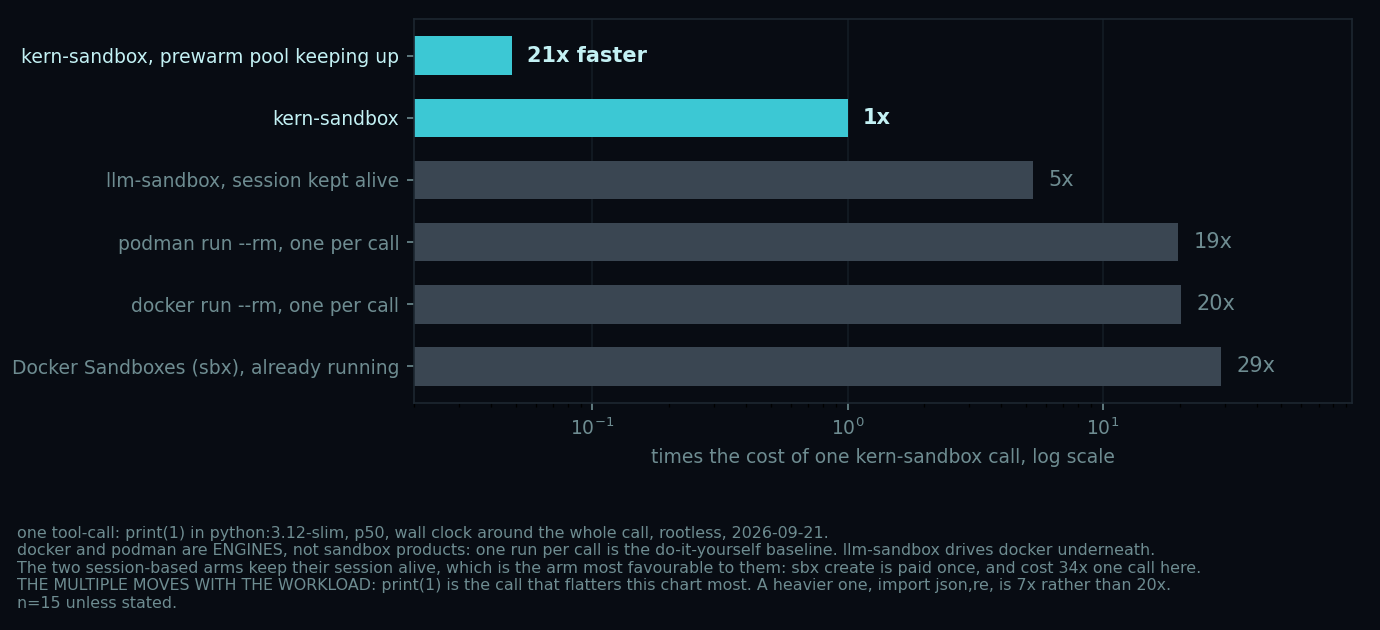
A tool-call costs a twentieth of docker run. Most of what is left is CPython starting
inside the box, not the box, so a heavier call narrows it: import json,re is 7x rather than 20x,
and 3x of that is the stock image compiling its standard library, which a
precompiled one removes. The
prewarm bar is what a call gets while the pool keeps up.
(BENCHMARKS.md has the method. Measure
your own.)
- a venv isolates imports, not the process: the code still has your files, your keys and your network.
docker runper call is the same idea with a daemon and a socket in front of it, and costs 20x as much per call. That socket is root-equivalent.- nono fences the environment you already have with Landlock, so your own tools are there and state carries between commands. This builds a new one from an image instead. Measured both ways in BENCHMARKS.md.
- bubblewrap and nsjail are the building blocks kern uses: no images, no cgroup caps, and no verdict, so you get an exit code and work out the rest.
- a microVM (Firecracker, Kata) or gVisor is a stronger boundary than this one, and the right answer when the code is actively hostile. It costs what a machine costs.
- E2B, Modal, Daytona do the same job in someone else's cloud, with an account and your code leaving the machine.
- Not a boundary against deliberately hostile code. Namespaces, cgroups and seccomp, for your own or semi-trusted code. If it is hostile or someone else's, use a microVM or gVisor: SECURITY.md.
- Caps bind only where your host delegates a cgroup.
kern doctorsays whether yours does;require_limits=Truerefuses to start rather than run uncapped. - Nothing bounds the workspace. It is a host directory, so a job can fill your disk.
- No
--user, so an image that refuses to run as root has no answer here yet. - Not inside a container without
--privileged, and not on Google Colab. A box mounts a fresh/proc, and the kernel allows that only where an unmasked/procalready exists. A container that masks parts of its own/proc, which is the default and is why it is safe, leaves none, so the box stops atmount(proc) failed: Permission denied. Measured on Colab, kernel 6.6.122. - The binary comes with the package only on Linux x86_64 and aarch64. Anywhere else pip picks
the wheel without it, and the package drives a
kernonPATHor in$KERN_BIN, installed with the install script.$KERN_BINalways wins over the bundled one.
Charts and mime-typed results without a Jupyter kernel, the full API, snapshots, and the measured sharp edges: SANDBOX-NOTES.md.
Runs on Linux, with unprivileged user namespaces and cgroup v2, and Python 3.9+. Windows through
WSL2; on a Mac, inside a Linux VM, where the same pip install is the whole install.
install notes. Apache-2.0.